|
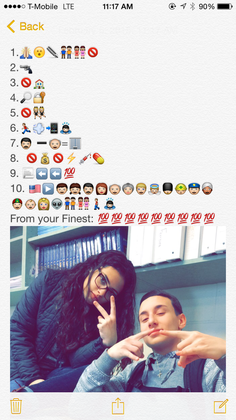
It doesn't matter the content, sometimes a good hook is all you need to motivate students to learn. Mr. Egnot recently asked his students to make Fakebook pages for historical figures; Mr. Kollar Instagrams math problems to his student followers from his living room and the grocery store; Ms. Lyttle has had students craft tweets about their reading. Using modern day interests of students is a good way to motivate students to work, but much more than that it is a great way to draw out critical thought. Students are forced to think in new ways about your subject when you ask them to juxtapose incongruous things, think humorously, or work in a non-academic medium. Moreover, this is a way to assess learning. Here are some tools to try: Emoji Mrs. Erin Stevenson, East Providence High School social studies teacher uses emoji to both solidify and assess student understanding of the bill of rights.
 Memes Sites like Quickmeme allow students to instantly make a meme about their lesson. You can have students make their own meme as an opener, a vocab or topic activity, an exit ticket, or even in place of an essay question on a test. Memes can be posted to a Google Classroom disucssion, class Edmodo, wiki, webpage, or Google Doc so that all can share and comment, laugh and learn. Now that we have Chromebooks, there are many meme-creating apps students can get from the chrome web store. Fakebook Here is a short walk though of Fakebook, including Ms. Thornburg's Fakebook for Rasputin!
Related Posts:
http://piedmontpd.weebly.com/piedmont-pd/how-to-use-fakebook http://piedmontpd.weebly.com/piedmont-pd/gifted-and-ib-conference-notes includes some great social media and meme ideas from Angela and Brian Housand
0 Comments
Leave a Reply. |
Categories
All
Author I am Lisa Gurthie the PD facilitator at Piedmont IB Middle School. She specializes in tech and arts integration, interdisciplinary, holistic education, and unschooling school to make it more real and relevant. One day I will modernize my "about" page. Check out the other blogs on this site for Lesson Ideas, Celebration of Good Teaching, and Piedmont PD Archives
November 2018
Categories
All
|

 RSS Feed
Photos used under Creative Commons from citymaus, The All-Nite Images, Lindy Buckley, peasap, Claudio Gennari ..."Cogli l'attimo ferma il tempo", mikemariano, faungg's photos, frankieleon, Chris Piascik, Kurisu, familymwr, kc7fys, el_itur, cowbite, eilonwy77, pestoverde, Marcin Wichary, Postmemes.com, alexliivet, UK in Italy, JoeInSouthernCA, Nathan O'Nions, jimmiehomeschoolmom, surreynews, Hans-Jörg von Schroeter, Bekathwia, CarbonNYC, marc falardeau, conorwithonen, LeonArts.at, Nina Matthews Photography, Georgie Pauwels, cwwycoff1, dullhunk, The All-Nite Images, Castles, Capes & Clones, warrenski, juhansonin
