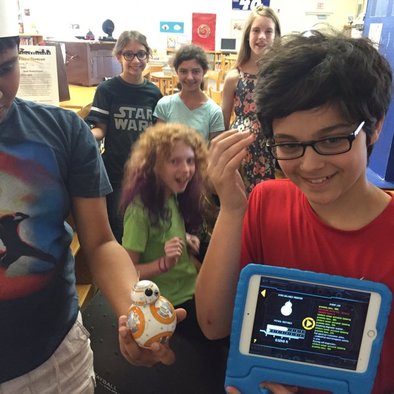
Thanks to Donors choose and Mrs. Newburger's eternal optimism and tireless grant writing, Piedmont's media center won a BB8 droid complete with iPad in a cool protective case for operating on the go.
Come by the Makerspace and check it out. BB8 already has a fan club, I think! Check out these photos and videos from the first two days of his life at our school. There's still plenty to discover. He can be coded, you can draw a path with your finger and have him patrol, he has been plenty talkative, and even has Augmented reality Star Wars action. It's a wonderful time to be alive, kids! The future is here! No, seriously, do you think my middle school library in the 70s had droids for loan? No, I tell you, they most certainly did not! - Love, Ms. Gurthie
Not the Skill You're looking for, there's plenty more to learn and do in the Makerspace!
http://piedmontpd.weebly.com/studentspace/category/makerspace Related Posts: Big Hero 6 and the Maker Movement
0 Comments
Owning your Genius and sharing it in School This post is written for Mrs. Alexander Brown's students as they begin their Whirligig creations. But the message is for student. It's not just how to make a video or build a whirligig or create a playlist, its a message about how to make school experience more meaningful by finding a way to put your genius into any task or topic. The What: You are a genius and the world needs your contribution. Do you believe that? It is true. Everyone is gifted. Not everyone is good at things that are traditionally rewarded by a grade. That's why only some people are labelled gifted as kids. But everyone has a gift. Everyone is amazing at something. What are you amazing at? Do your classmates know? Not every assignment is easy to put your genius into. But this one is. So practice now with this assignment. Don't throw something together at the last minute on the bus on the way into school. Don't make grand plans and then get overwhelmed and quit trying. Take a risk. Give yourself time to fail and restart. failure is not the end but the beginning and if you don't try something new now it only gets harder later. show us what you've got. If you aren't sure what you're a genius at, come see me. Because what I'm a genius at is noticing what other people are gifted in. the How:
After reading Whirligig, show your knowledge of the book by using your special talents to: create a mixtape or playlist (metaphors, for moments, describe why each song fits where, when for whom...) create an short film or imovie trailer (images can be taken if you download them on a desktop and then upload them to google drive. Chromebook has a movie app. build a whirligig in Minecraft or in real life (think about materials, thing about meaning...) Write draw or paint... other with significant advance notice- as approved my Mrs. Alexander-Brown The why: you tell me... Related posts: how-to for teachers Introducing a Maker Project to Students
Welcome, students, to Piedmont's 1st official Coding Club!
This is your club. Choose from these coding resources below to get started, and let me know if you have another resource to add here.
Related Posts: Make Your own Video Games with Tynker - includes Flappy Bird, Frozen, and more! Hour Of Code Games 2014  Codey is the cutest! Codey is the cutest! Tynker is a website that let's you easily learn to code starting from step one. Here is how to make video games on Tynker Some courses cost money but many are free. To test the Video Game design link at the beginning of this post, I clicked "remix this program" for the penguin game, then I saved my work. It asked me to log in and I did using my google account so you can do the same since all students have Google Drive (the same way you log into your Chromebook). If this is all new to you and you need help getting started wtih Tynker from step one, check these Tynker video tutorials that will show you anything you might want to do. It's so easy a little kid can do it, in fact elementary school students at Red Oak right here in CMS use Tynker to create hundreds of projects. Check out the games they designed!  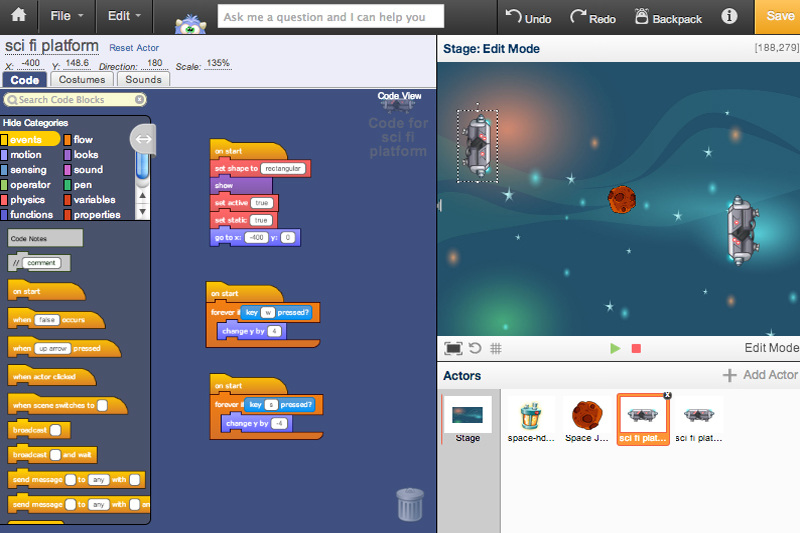
 If you are 13...
From now until October 7, Khan Academy and Breakthrough Prize are seeking video submissions that explain a challenging and important concept or theory in mathematics, life sciences, or physics. If you have a passion for explaining ideas and concepts creatively, you can enter the Breakthrough Junior Challenge! Learn more about the Breakthrough Junior Challenge Not only can you dig into a topic that you’re passionate about, but there are also great prizes to be won, including a $250,000 scholarship for you, a $50,000 award for your teacher, and a state-of-the-art $100,000 science lab for your school. The winner will also be invited California, where the prize will be awarded in front of the superstars of science, Silicon Valley, and Hollywood. If you enter, you’ll view and assess other participants’ videos in a peer-to-peer review process. Submissions will then be assessed by leaders in science, technology, and education selected by Khan Academy and by Breakthrough Prize laureates. The judges will select a winner based on how engaging, illuminating, and creative their video is, and how challenging the concept is to understand. The deadline for submissions is October 7, so register today at www.breakthroughjuniorchallenge.org. We hope you’ll be inspired to get involved - and share your passion for understanding the world! Onward, Erin and the Khan Academy content team
Piedmont Students:
Follow the steps below to claim your "NC EDCLOUD" account. This will be how you access SchoolNet, PowerSchool, Canvas and more. ThisVIDEO walks you through the steps.
More details here https://ncedcloud.mcnc.org/student-account-claiming-grades-6-12
The Metaphor:You can think of important elements of Digital Citizenship you will use this year in school like Harry Potter Houses. To learn about this we will travel to each of the Hogwarts house Common Rooms. In GRIFFINDOR house you will learn about Academic Honesty and IB from the Sorting Hat and sort yourself into the kind of person who is IB. In SLYTHERIN house you will learn DEFENSE AGAINST THE DARK ARTS for tech- the importance of Digital Safety to protect yourself from scams and predators. house you will learn from In HUFFLEPUFF house you will learn about your Digital Footprint is like your Robe people will see first about you and is alrways surrounding you and how creating a good one can help you live a happy professional social life. In RAVENCLAW house you learn how the tools of Digital Research like a magic wand help you CAPOW and CITE your sources right. The assignment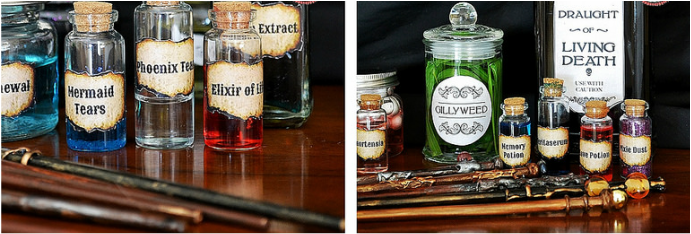 Griffindor: Create the most Powerful Social Media Wizard you can imagine Describe the Wizard, give him or her a name and tell what they do with tech (good or bad) that makes them so powerful. Ravenclaw: Create a Digital Research Wand. What is it made of? What's in its core? Why? Create a spell including a movement and magical word for your wand and tell what the spell does. Bonus if the movement and word relate to some practice useful academic research. SLytherin Create a Digital Citizenship Potions Tell for each: What are the ingredients? Why? What does each bring to the potion. What is the potion used to do or prevent? Hufflepuff Write a spell, be ready to perform/sing it. 
The following videos were created in Piedmont's Fun Arts Video Club run by Mr. Jermaine Coles. Scroll below for video making tips to make your own great videos with our makerspace materials.
Basic Video Do's and Don'ts
Do:
Don't:
Special Effects and Chromakey Special Effects Apps School iPads are equipped with
Greenscreen: Do you want to add you own specialized cool special effects and backgrounds to your videos? Just film in front of our MakerSpace Green Screen (in the media center hallway) then follow these instructions to edit your footage: Green Screen with the app TouchCast on school ipads Touchcast is free so you can download it onto on BYOT ipads - but greenscreen will not work on the Touchcast iPhone app. You can use your phone or iPod touch as a remote control for the ipad filming. Just download the appTouchCast Remote. Earn a DIY maker patch for your video and green screen skills 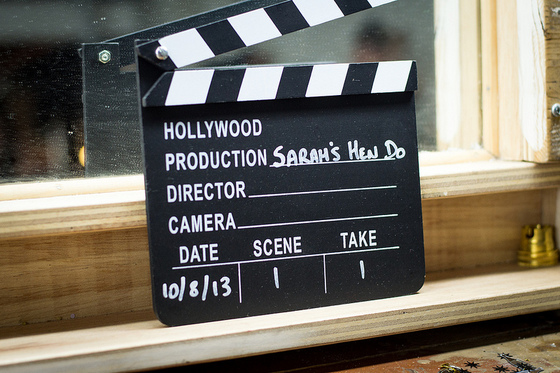
Click the clapper image to see great Piedmont student made videos plus instructions for making your own videos in school.
Upload instructions and examples of Piedmont students' movies http://piedmontpd.weebly.com/lesson-ideas/have-students-make-a-movie Check out these links to improve your videography skills: http://kidsvid.4teachers.org/ http://coolspotters.com/articles/the-mega-movie-making-guide-for-kids |
Archives
November 2019
AuthorThis is Ms. Gurthie's place for students at Piedmont and elsewhere to find resources to fuel their passions. Besides making fun lesson ideas for teachers, I wanted this space to provide PD for students too! Categories
All
|




 RSS Feed
Photos used under Creative Commons from HikingArtist.com, Leonidas-from-XIV, verchmarco, Ungry Young Man, final gather, Roel Cayas, download.net.pl, Alex Lupo, Roel Cayas, schizoform, IGypsyWoman, chris favero, Roel Cayas, Gamaliel E. M., Celestine Chua, kjarrett, aulbarnes08
