
What to do with extra time in a day so you don't waste learning opportunities? Here is a flex structure I created for a class class that will meet 3 days a week for 4 weeks, but this can be adapted as a daily class, or other. Thanks to Mr Ciambrone and the 7th grade teachers for the daily theme title inspiration.
I'm going to begin with some class-building discussions the first Tues and Weds and move into external content the first Thursday. Socratic STEAM Talk about it Tuesday - Students talk about the previous Thusrday's wonder in a circle facing one another and following socratic seminar rules for discussion. Write about it Wednesday - Students write plans of action, invention blueprints, private journal entries, advocacy letters, or social media posts about their final musings on what they saw and discussed. They will research if needed and have a share out. Think about it Thursday- Students view together a video on and then read about a compelling topic in science or social science, Tech, Engineering, Arts or Mathematics (like TEDed, Nature video, video about how to make optical illusions with math, etc) then think about it or do more research for the rest of class or on their own if desired. Resource Links: http://piedmontpd.weebly.com/lesson-ideas/first-days-of-school-how-i-create-climate http://piedmontpd.weebly.com/lesson-ideas/discussion-catalyst https://www.paideia.org/socratic-seminar-rules/ http://piedmontpd.weebly.com/lesson-ideas/host-an-academic-conversation
0 Comments
Sketchnotes UPDATE: All one needs to sketchnote is pen and paper. However, as visual notetaking apps become more popular, Here is apresentation to introduce the concept and process of sketchnotes notetaking to students. Some students will find it superior to traditional notetaking, some will prefer the old ways. Giving them an option will help personalize their education.  The One Pager Tired of traditional notes and summaries? Students summarize in one page. It reminds me of Doodle Notes or Sketch notes (see embedded slideshow below) and is a great visual way to remember plus a great thinking exercise in summation to solidify learning and it also forces students to make critical decisions about what to include and why. Try this when reviewing or even to quickly cover a topic or for a bit of arts and graphic design integration. Great way to introduce a bit of visual literacy as well. Thanks to Ms. Adornato and her PD book discussion group for the one pager idea. 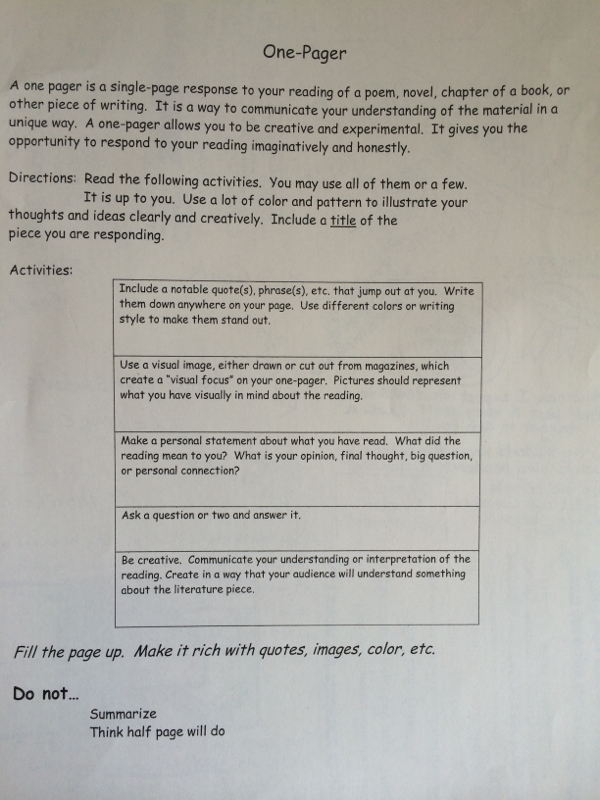
Are you considering trying a STEAM-infused student-choice-driven product into a curriculum that is usually paper and pen based? Ms. Brown and I use these talking points to introduce Maker Movement STEAM-infused learning into her sevent grade English Language Arts class for a novel project.
Here is the basic gist of how we introduced it together that you can adapt to suit your needs:
"The Maker Movement is something teachers are excited about in education because it gives you an opportunity to use your gifts that may not be traditionally gifts you can use or show off in school. Now some of you are straight A students (is it cool to be straight A? Yes it is!) and for you writing might be your gift. You should choose to re write the ending. Maybe writing is your thing but you are usually a songwriter - then write a song. Maybe you struggle with words but you are good at building. This is your chance to use that skill. Many people say that the future will need you to use your skills for entrepreneurship more than we had to in Ms. Brown and my's day. So you need to know what your good at and how to sell yourself as a brand so people will want to hire you. Don't choose the art choice if you don't have still in drawing. Don't wait til the last day and try to draw something on the bus when you have no skill, haven't made it special. If you know what makes you special, then do that. If you don't know come see me in the media center and I'll help you choose. One skill that is becoming more and more important is the skill of videography. (Tell story of $75,000 Belk Video Contest) If you'd like to do a video trailer of the book, I will be back next week to show you how. You need to really tell the story with video. Make a trailer, but don't make a video that doesn't really speak to the book or show your knowledge of the characters. Maybe you'd like to create a 3D Object- Choose the whirligig building choice. If you know someone who is good with tools and that is something you'd like to do ask them to help you build with wood. You can also just cut paper and straws. But whatever you do make it great. One of the points of maker movement is to use skills we don't always give you a chance to develop in school. You can code a whirligig in Scratch, engineer one to move, anything you want. But start work early so you have time to do a good job, or to fail and decide you want to change. Don't wait unitl the due date. Show off so I can post it and make you famous! Hopefully what you make will inspire other students to be their best and other teachers to try more projects like this.
RELATED POSTS: http://piedmontpd.weebly.com/celebrating-piedmont/whirligigs-an-example-of-maker-movement-in-education http://piedmontpd.weebly.com/lesson-ideas/have-students-make-a-movie http://piedmontpd.weebly.com/lesson-ideas/makerspace-resources4pbl http://piedmontpd.weebly.com/celebrating-piedmont/love-of-learning-at-piedmont Many teachers here at Piedmont have used student-created movies to teach their content. Above are just two examples - a stop motion film of an scene from Seedfolks for Language arts and a video of a student created Minecraft Pyramid from Mrs. Kay's social studies Ancient Egypt unit. Try these lesson plans to get started
Our School Resources:
Recommended BYOT apps for movie making :
If using a shared ipad, you can upload and download the video as needed from Google Drive: (Sorry I ironically broke the cardinal rule of movie making - NEVER HOLD YOUR DEVICE LONGWAYS Learn from my mistake!) This video shows how to upload and share from your device This video shows how to turn in a video link for an assigment on Google Classroom Do you know that IQ is a myth? That the test was never meant to be given to neurologically healthy individuals and especially for it not to be used for ranking. Yes, there is such a thing as talent, but IQ is not fixed and everyone is gifted at something. Do your students know this? It's time to tell them because students who believe there is such a thing as "smart" or "dumb" do not try as hard as those who believe that smart can be achieved with effort. For more on growth mindset google Carol Dweck 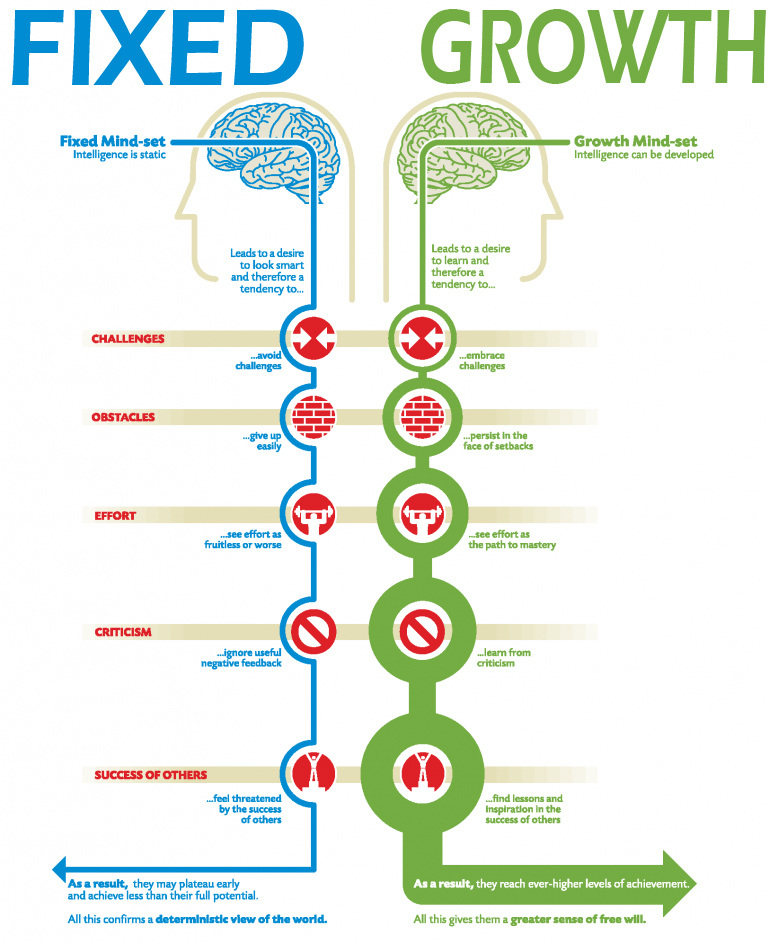 Following is a Youtube Playlist of videos that explain growth mindset. I am in a training right now that says we should explicitly teach students growth mindset. The video they used (in the playlist) is called Austin's Butterfly and it shows the butterfly images in the photo below. It illustrates how students can all get better over time with focused effort and constructive feedback. If you take time to show how this first grader improved his butterfly drawings from drawing one to drawing six, students will be more likely to trust that they will improve equally stunningly in your class. 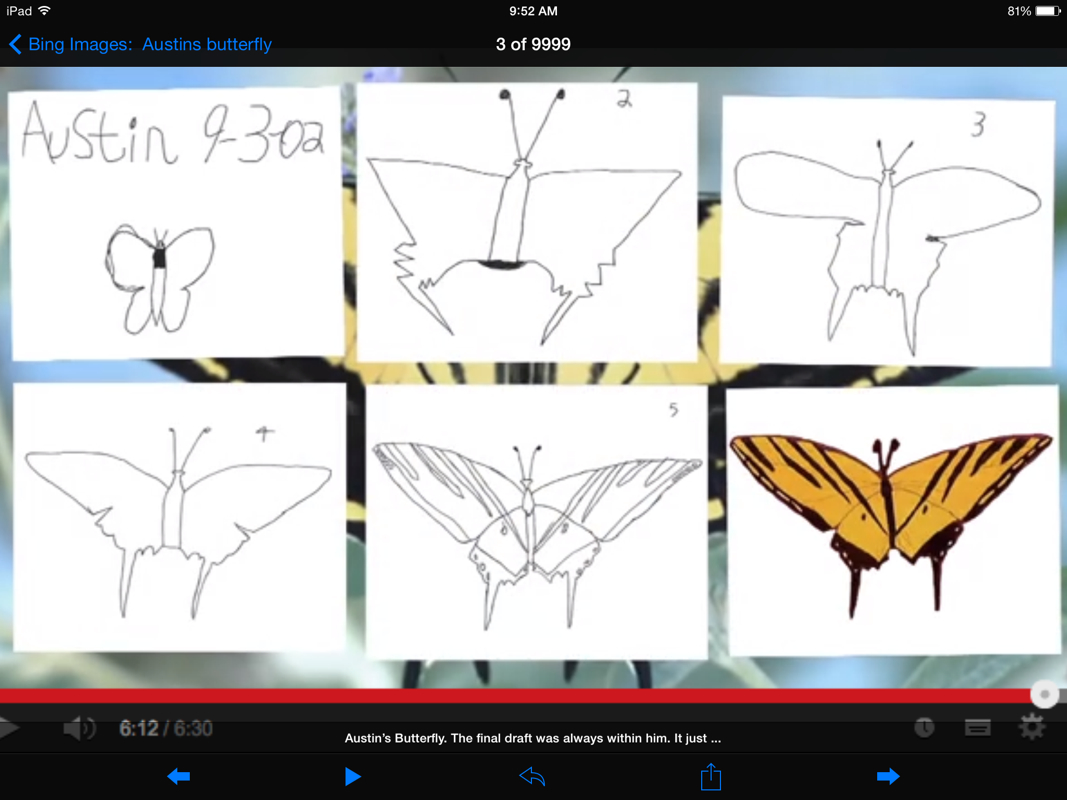 Another growth mindset example students might understand is the video game example. When a student starts out on level one and they die, they are not sad about it, they just keep going knowing full well that they will improve with practice. Help them transfer that surety and confidence to the effort they put into your classroom.
See me if you want to connect this to your actual content lesson in a more direct way or if you want me to come speak as a former psych teacher to your students about neuroplasticity (I can even tell them about the student I taught who LITERALLY had half a brain- and her entire brain rewired so you would never even notice!) |
Categories
All
Author I am Lisa Gurthie the PD facilitator at Piedmont IB Middle School. She specializes in tech and arts integration, interdisciplinary, holistic education, and unschooling school to make it more real and relevant. One day I will modernize my "about" page. Check out the other blogs on this site for Lesson Ideas, Celebration of Good Teaching, and Piedmont PD Archives
February 2021
Categories
All
|
 RSS Feed
Photos from citymaus, The All-Nite Images, Lindy Buckley, peasap, Claudio Gennari ..."Cogli l'attimo ferma il tempo", mikemariano, faungg's photos, frankieleon, Chris Piascik, Kurisu, familymwr, kc7fys, el_itur, cowbite, eilonwy77, pestoverde, Marcin Wichary, Postmemes.com, alexliivet, UK in Italy, JoeInSouthernCA, Nathan O'Nions, jimmiehomeschoolmom, surreynews, Hans-Jörg von Schroeter, Bekathwia, CarbonNYC, marc falardeau, conorwithonen, LeonArts.at, Nina Matthews Photography, Georgie Pauwels, cwwycoff1, dullhunk, The All-Nite Images, Castles, Capes & Clones, warrenski, juhansonin, Ke7dbx, Muffet
