Piedmont PD
  • Celebrating Piedmont
  • StudentSpace
  • Piedmont PD
  • Lesson Ideas
  • News and Thoughts

Reading for Understanding

3/27/2014

0 Comments

 
PictureImage links to info and video on the program.
Since our balanced literacy pd at staff meeting, I've learned a few more things about "disciplinary literacy" the secondary school term for it. First off I learned that Ms. Adornato is a great resource on the subject. She pointed me to an immediately useful site for integrating this into your teaching. Go to Achieve the Core to search for literacy materials by your subject and grade level

Also, I recently attended a three day very intensive training on Reading for Understanding: How Reading Apprenticeship Imrproves Disciplinary Learning In Secondary and College Classrooms. 

Here is a 21 page PDF of the most useful resources and tools for learning and practicing the Reading Apprenticeship strategy. 
I am a big learning geek so I really enjoyed the three days immersed in educational theory and practice around disciplinary literacy. 
I will gladly discuss this more one on one with you, run a sample of the kind of reading they advise with your students, or do a mini-PD on disciplinary based literacy for your PLC. Let me know!


What I learned at Reading School Last Week:
  1. Disciplinary literacy is sort of like balanced literacy. It is the more secondary school term
  2. Reading as a process does not HAVE to be verbal. We can "attack" a "text" such as a graph, chart, geometric figure or equation, photograph or video and be using the SAME skills as reading analysis.  Our vision of what a "text" is is sometimes limited by the narrow definition of the word "reading"
  3. Everything hinges on making the child's thought processes visible as they read a text (or "read a "text")
  4. Piedmont is SO ahead of the game on this! Some actually said that getting students to discuss readings was "utopian" and the video we'd seen looked like ANY typical day here at Piedmont!
  5. Metacognition is the KEY. This practice of being aware of what you are thinking and of vocalizing or writing down those thoughts as they happen will feel uncomfortable at first but can become natural in a day and a half. Model and Practice it first out loud yourself in class for a few days before you ask students to do it. (see Best Practice #4 below)


Best Practices:

  1. NOT everything is meant to be close read! Do not use this method with all of your readings!
  2. Give students the right tools for the job of dissecting their reading.The workshop  uses "reading Supports" like having highlighters, colored markers, post its of all shapes and sizes strewn around the desks as a physical manifestation of learning.
  3. This method as described is very paper-based but if you want to try paperless, sites like Diigo will let you annotate electronically.
  4. Teach metacognition via modelling: When reading, demo your own thought processes out loud ALL the Time
  5. Partner reading to teach metacognition: During in class reading, partner up your students. Have one student read, the whole time saying aloud what they are thinking as they move through the reading (This is written by rodriguez, oh the author is hispanic. This reminds me of my friend who is from Mexico. Ew that word is hard. I wish I could stop reading. what does that mean? I wonder where  this is going- this line makes me think that the author ..." The partner will record what is being said. Then have the partner share what was said that they found illuminating, not the actual thinker!

0 Comments

BYOT -Getting Started for Teachers

3/24/2014

0 Comments

 
Picture
Bring Your Own Technology  - Getting started for Teachers and Schools
The why and how of Piedmont's BYOT rollout -shared by request for those just getting started.

General Advice
Don't force implementation
no procedures need change in a teacher's room until they are ready
Don't force teachers to use BYOT in their classes or attend training, just create procedures, share best practices and rules,  turn the guest network on and let the "early adopter" teachers have at it. Others will come when they are ready as they realize the great benefit it can be. Toward that end, check out the video on this page Real Teachers Talk Tech . It describes the natural progression of our teachers turning tech-y as BYOT became more of a natural event.

That being said, resistant teachers may want to take note that the "real world"  is BYOT -- students feel handicapped when they are not allowed to use tech, especially as they get used to googling as their curiosity dictates, snapping photos of work they wish to keep, or using an online calendar to keep up with assignments. Teachers who choose not to use BYOT should devote appropriate time being clearly explaining to students the reasoning for their choice. Otherwise students will naturallly feel resentful being hampered from learning and organizational tools they use in real life and other classroom. If this is not done, students will feel resentful and class climate will suffer.

Equity Observation
Contrary to what some fear, BYOT is more of a socioeconomic equalizer than it is a divider.
Your poorest students will greatly appreciate the free wifi- something the richer students have at home already so this helps level the playing field and at least give access.

Students don't mind using an older device and the smaller the better for many students across all socio levels. For those students whose "tough" image means they don't want to be seen "doing school", note that in my experience at the middle and high school levels those same children who are embarrassed to bring a bookbag and who never seem to have paper and pencil are actually more likely to have a phone or ipod touch.

Remind students that an old no-service phone will work and that what they bring is a matter of personal preference--doesn't have to be a smart phone and thanks to school providing wifi their device doesn't need a data plan! We have kids using cracked screen phones, ipod touches, old no-service phones, kindles, the whole gamut and no one seems to mind or be judgemental. 


BYOT  Tips for Teachers
  •  BYOT devices can be easily used one per group so not every student needs one. For example, one person can research, one device can submit the group's answers to Socrative, TodaysMeet or PollEverywhere; One student can create and share work via Google Drive and others can access from school computers at a later time.
  • You don't have to be a tech expert to try BYOT- teachers automatically learn and grow in their tech comfort from their own students when students are allowed to use their devices in class  - again,see Real Teachers Talk Tech
  •  BYOT devices can be blended with school tech devices to make the most of limited resources. Many students like to "multitech" by using one screen for research, another for notes.
  • Monitor you students' screens through proximity, circulation, reminders and questions . Be very careful as some apps can circumvent filters even when on the BYOT network. It is your responsibility to make sure students are not circumventing. Monitoring hint (thanks, Ms. Suckstorff): On iPhone and iPad a double click of the home button shows which apps are running in which order the child opened them.
  • Post, teach, and enforce clear BYOT rules and procedures for when devices can be used (only at explicit device time. can put sign on board or other-see sample signals below) and where devices should be stowed during non-BYOT time. (depends on how frequently you intend to use student devices- can be kept out of sight, on corner of desk, cover closed or turned upside down, etc)
  • Clearly communicate with students verbally as well as non-verbally the procedures and times when devices must remain invisible, or be turned screen side down, or be out as per teacher instruction and what is best for the learning objective of the class, the day, the minutes...
  • Have clear consequences- Remember that tech is no different than anything else at Piedmont- failure to comply with a reasonalble request applies here as well.
  • Model your own technology use. Be metacognitive out loud for students when using your own BYOT or school provided tech. "i think I took a photo of that board assignment here in my docs" "I like to use an app for that" "I am going to access my Evernote because that is the best way for me to save this site for later. I'm going to put it in my file labelled..." "Oh, I see this site showed up in my Google results, I'm not going to click on it because..."
  • Sample signals for BYOT time:
  1. Redlight icon= no tech allowed, Yellow light = tech visible but hands off or turned over. Greenlight use allowed
  2.  picture of a phone posted on the board when devices are allowed
  3.  Sign at the entrance to their room with a phone or crossed out phone icon as desired.
  4.  Signage on hallways cafeterias or other BYOT friendly or BYOT restricted areas (restrooms should be BYOT restricted)

Sample BYOT Rules and regulations
  • District Rules-The Charlotte-Mecklenburg Schools Internet use Policy :http://bit.ly/R3YSFb (CMS BYOT frequently-asked questions can be found here: http://bit.ly/SI9lo )
  • School Rules- http://msgurthie.cmswiki.wikispaces.net/Online+Rules+and+Procedures including the PDF of Piedmont's electronics policy also posted at  Piedmont's main website.

Application
This was our application for Piedmont to be chosen as a BYOT school in our district - Some of the application is reprinted below,  but includes rationale and step by step timeline. Remember this was written before we actually rolled it out--I have to say it was a lot less "fuss" than the application makes it seem. It was very natural.

BYOT Device Registration Form
We created this form to help keep track of devices being used on our campus

BYOT Q and A

Q:Which devices work for BYOT?


A:Remember BYOT is optional. Students do not NEED to bring any device at all. Some will like the convenience of using a device. If so, any device (see below) with wifi capability will work with BYOT so whatever tech fits your child and the family budget is what's best to purchase. Try to get an idea of what your child prefers, but here's a quick pro con list for families that have several options to consider:

Full size laptop

  1. -most power and functionality
  2.  best for serious student who is careful and gentle and never loses their stuff and doesn't mind being tied to a weighty backpack. (not the average middle schooler)
Tablet or Chromebook (most recommended for versatility but smartphone may be best for some students-see below) 
  1. -durable and simple.no need for flashdrives or expensive storage because student can use cloud storage because we have GAFE (Google Apps for Education)
  2. -big screen for navigating websites like DiscoveryEd
  3. -Chromebook is most versatile and least expensive but needs a good case because it seems to be delicate.
  4. -for Tablets Apple ipad or the Surface tablet are the two with the best reputations but even the least expensive ones are fine.
  5. -iPad has the best educational apps but the Android apps are quickly catching up and surface tablet has ability to use flashdrive.
MORE PORTABLE CHOICES some students may not want the bulk or weight or may want something that fits in the pocket.

E-reader or mini tablet (iPad mini, Kindle, Nook)
  1. -paperback size screen can be hard for some sites, but is fine for most uses and may be preferred for portability
  2. -price is less expensive than the full tablets
  3. -iPad mini or Kindle fire best reputation for the most versatile education uses.

Cell Phone, or iPod touch
  1. -lightweight, convenient and easiest to store all day
  2. -fits with the way modern life is already structured
  3. -small screen makes some websites too hard to navigate (Discovery Ed for example) some don't mind typing from the small keyboard, some do.
  4. -most economical option-do not need cell phone contract or data plan to use for school as long as it can join wifi  Even old regular (non-smart) phones with a keyboard or touchscreen will work if they have a browser however this is a limiting option option)

Most students report being satisfied with the device they currently have. Everything has limitations in all cases the most important thing I can recommend is a protective cover or case for whatever you choose!
Email me at the envelope icon att his page if you have any specific questions. For shoppers, most stores will be happy to demo the options they sell and then you can compare prices on the internet as well if desired.


Q: How do you start using BYOT wireless network?

A: Next time when you want students to research or use the web, you would allow them to take out their phones or other electronic device. Kids would go to their settings and connect to the wifi by choosing the cms unlocked guest network. There is no password but hey must click "accept" when the cms screen pops up. It may be a long time before everyone can get on wifi at once so be aware the whole school can't be surfing. It must for now just be for specific lessons. PLEASE Do not let kids suck up our bandwidth playing that another teacher may need for a lesson. That would be breaking rule 1. Also, it is fine if you want kids to type notes. If possible, have them do any work like notetaking or paper typing offline and synch to the cloud later (email me if you want me to demo how to do this).

Q: What if I can't join the guest network?

If you have checked your settings and chosen the network and accepted and still cant get on, it may be that all the access points are full. Until more bandwidth and access points (hotspots) are installed we will be more of a true "get on whenever you want environment". For now, check with neighbors whose wifi hotspot is near you and take turns giving it a try at a time when the others aren't going to be on wifi. Also note wifi will be much slower during testing as well as other high use times.

Q: How should we use BYOT?

1-For independent learning - At teacher discretion, students are welcome to use BYOT for online and ebook reading, research, cloud storage of notes and projects, etc.Teachers may also use it for their personal devices, however the wifi is student filtered for all since there is no login feature with the guest network.

2-For class assignments- Students can also use BYOT for class assignments when teachers choose this option. BYOT integration can be as simple as no longer needing to save for later or skip those questions in your textbook review pages that say " take students to the library and have the students research " or "Bring in a newspaper article about _" With BYOT, students can be researching right in your room.

3-For much more. Check out the 3 videos at the very bottom of this post (scroll down) to spark your thinking:

  • Video 1 below-Vision of What BYOT can do for Piemont students- all of them- because most cell phones without service will work with both our BYOT wifi and Evernote (the subject of this video)
  • Video 2 below-This video below shows a joyful trusting buzzing media center/tech hub where students use their phones to work. It kind of captures Piedmont's Open vibe:
  • Video 3 below-This is a 5th grade class where the teacher is completely calm and the kids are learning. There are some things I don't like about the video, but it shows that using tech can be less stressful on the teacher than traditonal learning with clear rules and procedures.


Q:What if someone isn't comfortable using BYOT?

  • Remind them that BYOT is optional. Students do not have to bring devices to class and teachers do not have to allow their use.
  • Read this blog post by CMS teacher and BYOT leader Jill Thompson
  • http://insidetheclassroomoutsidethebox.wordpress.com/2012/07/22/getting-teachers-and-parents-comfortable-with-byot/
  • General Educational benefits: __http://brainmeld.wordpress.com/2011/03/24/one-to-one-computing-get-on-the-bus/__
  • Offer a tech petting zoo - We can do this at conferences, parent events and school functions __https://twitter.com/40ishoracle/status/167995039375556608__
  • All tech are nothing more than learning tools. Whether learning tools are paper based or electronic based, we at Piedmont will continually work together- teachers, parents, and students as needed, assessing on an assignment by assignment basis. The Optik rubric for evaluating tech effectiveness is one example: http://www.netc.org/images/pdf/observation.rubric.pdf
  • Further inspiration- besides videos below, this one speaks to the motivation potential of BYOT:

For Further Reading:

  • Making the most of kids devices:http://theinnovativeeducator.blogspot.com/2012/07/10-byot-byod-back-to-school-basics.html
  • __A BYOT "Newspaper" http://paper.li/SteveHayes_RB60__
  • http://pinterest.com/jamesdigioia/byot-in-education/ you must access this one from home or an unfiltered location.
  • http://blog.evernote.com/2012/02/14/evernote-for-schools-site-resource-for-using-evernote-in-education/
  • Sample Site to teach website credibility assessment (as wifi is worked into the daily class routine and there are more opportunities afforded for such instruction daily.) http://zapatopi.net/treeoctopus/
  • Sample reading tech integration that aligns our traditon of sustained reading already in place as well as with common core and literacy goals (example __http://thetechclassroom.com/rss-as-ssr/__ )
  • β€œThe integration of 21st century tools will prepare students to be career and college ready.”
    --NCDPI State Technology Plan
    (click to view it)
  • Twitter (see below) has quite a few hashtags to check out regarding how schools are using BYOT. Connect with me or go to Cybraryman's Twitter Hashtag page to explore

Students efficiently multi-teching in #CMSk12 with @mgbthornburg new #Chromebooks , @edmodo + #BYOT = #paperless pic.twitter.com/ghaAJrQ4DL

β€” Lisa Gurthie (@LisGurthie) September 6, 2013

@LisGurthie: Best use of bulky textbooks? Propping up your #edtech device #paperless #rethinkschool #byot pic.twitter.com/I9ZoFOoUWE

β€” Lisa Gurthie (@LisGurthie) May 15, 2013
0 Comments

Padlet

3/14/2014

0 Comments

 
PictureClick the Crane to be taken to Padlet!
Our intrepid early adopter Principal Barone demo'd Padlet at Wednesday's faculty meeting as we wrote our thoughts on her wall.

To use Padlet in your class, go to http://padlet.com/ and click "build a wall"-that is all! it is that easy! Get the embed code to embed it into a wiki or webpage or link to share it by clicking share/export (the icon of a box with an arrow coming out of it along the right hand side of the screen once you build the wall)

Remember to review with  your students how CMS and Piedmont rules are in effect even in online sharing spaces . Use it as an opportunity to teach
digital citizenship.

0 Comments

Balanced Literacy March Faculty Meeting PD

3/12/2014

0 Comments

 
In this PD presentation (Slides can be found at  http://bit.ly/supportedread ) we discuss and practice the 4 components of balanced literacy. Read on to see how.
Picture
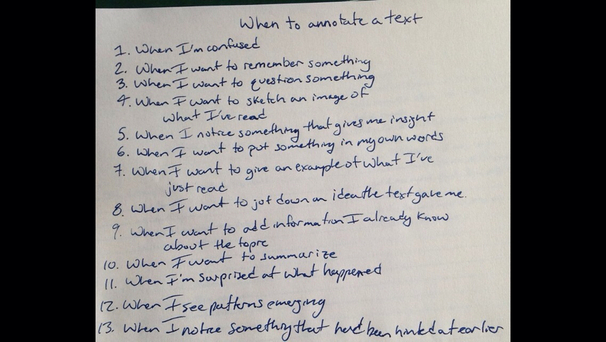
Part of close reading is simply writing as you read and being aware when and why to do so. This 9th grader's teacher taught him to be metacognitive and he now keeps this list as he reads.
Picture

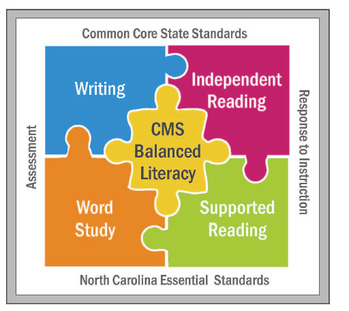
Our March faculty meeting demo'd the 4 pieces of Balanced literacy according to CMS. Balanced Literacy includes these 4 areas:

  1. Word Study- BL says word study makes vocab fun. We used Word Ball to practice and refresh our memory of  RTI terms. (led by Ms. G and Ms. D)
  2. Independent Reading -we practiced Independent reading with common core reading standards with Padlet response (led by Ms. Barone)
  3. Writing - We clarified our ideas by writing them on the puzzle pieces during our centers walk (on display in admin hallway)
  4. Supported reading - we practiced close reading with a socratic seminar on this selection The Wejr Family Awards : using and the student note and worksheet photos in this post (led by Ms. Gurthie)
More and further Reading Choices:

More on Balanced Literacy
  • CMS BL  Powerpoint - web cache do a google search to download the one with graphics)
  • http://www.k12reader.com/category/balanced-literacy/

More on Close Reading-

  • Wendy Adornato recommends this site-very easy to find useful core friendly close reading and other by subject.  http://achievethecore.org/
  • Close Reading PDF -including sample chart of a close read of Page 1 of Percy Jackson Lightning Thief
  • Close Reading PD Student Explanations Video Snippets

More on Common Core Reading and writing in general-


  • There are a lot of misconceptions about Common Core. I like the way this site breaks down how to teach reading and writing via Common Core.
  • Non-Freaked Out Common Core blog (note I think he is too into debate - I prefer shared inquiry, but either way he's a great blogger for laying out common core)
  • Recent News after 2 years of implementing common core-what was learned

  • Rationale (why Common Core and balanced literacy are useful) Besides the value to one's life of being able to ask questions and think critically, here are 12 Skills Employers want that Common Core teaches


Below is an embed of the article we read for the close reading demo. we annotated electronically using diigo or on paper .
Picture
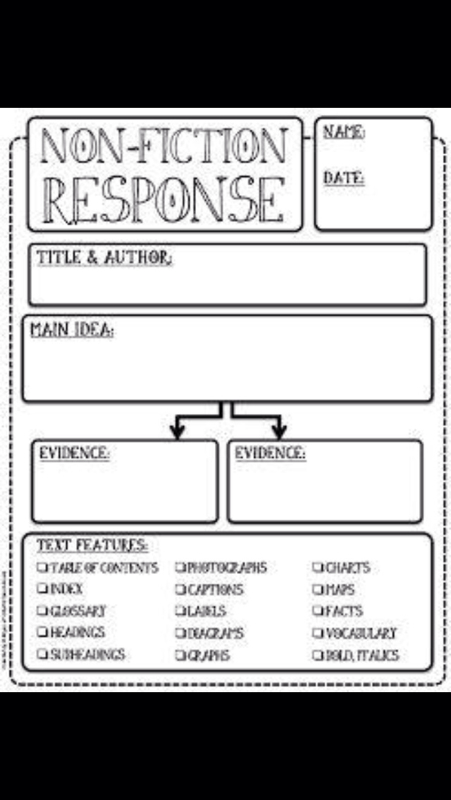
This chart (shared on Facebook) can be useful when close reading in the content area or any nonfiction.
0 Comments

    Author

    This blog is a compendium of District and Piedmont -specific PD opportunities, trainings, and notes. 
    Authored by  Lisa Gurthie 
    who specializes in creative lesson ideas especially critical, holistic, and divergent thinking, tech- and arts integration, respect- and curiosity-driven education, and unschooling school to make it more real and relevant. One day she will modernize her "about" page.

    Archives

    November 2019
    July 2019
    March 2019
    December 2018
    November 2018
    October 2018
    September 2018
    February 2018
    October 2017
    May 2017
    April 2017
    March 2017
    February 2017
    January 2017
    December 2016
    November 2016
    October 2016
    September 2016
    August 2016
    May 2016
    April 2016
    February 2016
    December 2015
    November 2015
    October 2015
    September 2015
    June 2015
    May 2015
    April 2015
    March 2015
    February 2015
    January 2015
    December 2014
    October 2014
    September 2014
    August 2014
    July 2014
    May 2014
    April 2014
    March 2014
    January 2014
    November 2013

    RSS Feed

    Categories

    All
    1:1
    2minpd
    Academic Conversation
    Badging
    Blended
    Certifications
    CMS PD
    Common Core
    Community PD
    Critical Thinking
    Culturally Responsive Teaching
    Ed Reform
    Efficiency
    ELL
    Embedding
    Flipped
    GAFE
    Games
    Google Classroom
    HardFun
    Interdisciplinary
    Maker
    Paperless
    PBL
    Personalized
    Personalized PD
    QR Code
    Reading
    Science PD
    Short URL
    SIOP
    Social Media
    Tech

Powered by Create your own unique website with customizable templates.
Photos from docoverachiever, memebinge, Ivy Dawned, www.ilkkajukarainen.fi, Muffet, Diana Boucino, Stephane .Jaspert, sanazmy97, kevin dooley, Mike Licht, NotionsCapital.com, studiohzwei, The Daring Librarian, bobbi vie, madnzany, lisibo, Tjeerd, Nicola since 1972, Brett Jordan, ~Matt LightJam {Mattia Merlo}, denise carbonell, The Lex Talionis, Toolstotal, liverpoolhls, Ninara

  • Celebrating Piedmont
  • StudentSpace
  • Piedmont PD
  • Lesson Ideas
  • News and Thoughts