Earn PD credits plus have a head start on next year's planning!  This could be you frolicking in fields of flowers after your year is all planned! Summer PD offerings links: You may need to be signed in to your cms google drive account to view the catalog.These PDs are only available to CMS schools that took part in the Personalized Learning pilot like we did (we are cohort 2) but the topics are helpful for anyone who would like to get better use of their teachnology, better student buy-in on assigments, and who would like to front load their planning so that classes run more smoothly day-to-to day.
Note these two courses: 1-ONLINE PD INS Time to Own It Virtual Course Summer 2016 MyTalent code 429875 Would you like your students to own their own learning? Would you like them to be able to tell you at any time which of your course standards they have already mastered and which they need to work on? If so, sign up for this course:
2-IN PERSON PD THINK TANK MyTalent Code: 416080 Open work session time! This is a chance to collaborate with other grade level teachers and PL Specialists and front load your planning by creating playlists, pathways, choice boards, PBL's, etc. During this work time, you can walk away with a product to use during this school year! Be sure to bring any standard resources, tasks, or a device that you would want to utilize
Related Posts: http://piedmontpd.weebly.com/piedmont-pd/how-to-use-mytalent-to-register-for-pd-the-new-mypd
0 Comments
Use these Tools for "Blended" Learning :Mr. Parkins, Dean of Students notes 2 new programs purchased for everyone to use. (Passwords must be requested from CMS) http://www.problem-attic.com/ http://www.edgenuity.com/ (information site) https://learn.education2020.com/educator/ (educator sign in) These are in addition to CMS purchase of GAFE (GoogleDrive, Google Classroom) Compass Learning, Dreambox, DiscoveryEd, and others you may already be familiar with. Check here for a full list http://www.cmslearns.org/blended-learning/ PD Opportunity in My Talent- DifferentiationNew Credit Courses offered help you think about the broad concept of differentiation (not specifics of 1:1 or efficiency tips and trick like HOW TO CREATE A TEST THAT GRADES ITSELF !) If you've wondered
CMS offers a quick series of self paced courses for you on the concept of differntiation. Click through them anytime between now and May 15th. You can register for any or all of these courses, do them at your own pace, at school or home, with friends or alone. There is no homework, and they will give you confidence and a better overall vision of how to best use 1:1 to personalize and blend. Want To Register?:
After registering for a course, return to your Professional Learning page and click on the course name to start! I did all courses and quizzes in a few hours total, the resources were mostly review but good (except they still link to learning styles quizzes even though learning styles tests are scientifically invalid as we all use different modalities according to task, mood and interest) To make sure the courses count for renewal contact your district specialist. Apparently there are differences in whether they are accepted or not. We have also put in an application for a grant to have experts come in to help us tweak our current system if you want. We'll let you know if we get them and offer anyone who's interested to have a helper come work with you. In the meantime, Lisa Gurthie is happy to come to your room, team planning, or department PLC.  Now that we have 1:1 devices every day; now that we can trust we have access to tech daily, how should that change our teaching? How do we ensure these changes are worth it to us and to the students?
As Ms. Barone has said, we never want to be a school where children are glued to a screen all day and not doing the active collaborative IB learning that makes Piedmont so awesome. But, how do we use these screens for learning? The following info is from CMS' Office of Organizational Development There is a new PD management system within MyTalent. Above is a brief introductory video on it (Professional Learning) NOTICE: Delay in Processing Outside CMS Renewal Credit Requests: · If you have submitted a request for outside CMS professional development or submitted a CEU report from a prior district, please note that requests will be held, but we are unable to process them at this time. How to request renewal credit for outside CMS professional development in MyTalent/Professional Learning. Log in to the MyTalent System using one of the following browsers: Mozilla Firefox or Google Chrome
If you are submitting college courses:

 You can now earn professional development renewal credits from the comfort of your home or mobile device with Piedmont's new online professional development offerings.
Separate self-paced assignments for the latest IBO training webinars are now available on the Piedmont Google Classroom PD site. The online Google Classroom for Course 1 - IB Webinars 1-5 is running now . Course 2- IB Webinars 5-10 will be offered next year. All you have to do is go to classroom.google.com, login with your work email and Google Drive password, click the + sign at the top of the home screen and join with the code that was listed in your weekly bulletin (see Lisa Gurthie if you need the code) and start earning at your own pace. Each of the 5 Google Classroom assignments consists of:
Start learning and earning today from the comfort of your own home! Information about how to receive credit in MyTalent will be forthcoming as soon as the course is available on that site. Related posts: Update: video now has sound! 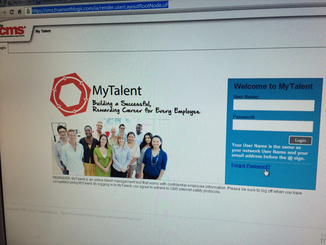 CMS has replaced MyPD with MyTalent . Click the photo to be taken to the sign in screen and and follow along with the video below to find and register for your classes. You will use MyTalent to register for courses that you want licensure renewal credits for. Here's how (beginning with how to access the login screen from the intranet): From CMS PD office:
Did you know that there are changes to the National Board for Professional Teaching Standards certification process? The cost and amount of portfolio work has been reduced while the time allotted to complete the certification has increased. The state of North Carolina currently pays an additional 12 percent of your base salary once certification is completed. Study groups are now available for registration in the Professional Learning section of My Talent. We hope all initial and renewal candidates will join us on Saturday, October 11, 2014 for our Candidate Kickoff. If you want to participate in this year's certification process, find more information at http://pdsupport.cmswiki.wikispaces.net/National+Board+Information Email us at nboffice if you have questions after reviewing the pages on the wiki. |
AuthorThis blog is a compendium of District and Piedmont -specific PD opportunities, trainings, and notes. Archives
November 2019
Categories
All
|
||
 RSS Feed
Photos from docoverachiever, memebinge, Ivy Dawned, www.ilkkajukarainen.fi, Muffet, Diana Boucino, Stephane .Jaspert, sanazmy97, kevin dooley, Mike Licht, NotionsCapital.com, studiohzwei, The Daring Librarian, bobbi vie, madnzany, lisibo, Tjeerd, Nicola since 1972, Brett Jordan, ~Matt LightJam {Mattia Merlo}, denise carbonell, The Lex Talionis, Toolstotal, liverpoolhls, Ninara
