Piedmont PD
  • Celebrating Piedmont
  • StudentSpace
  • Piedmont PD
  • Lesson Ideas
  • News and Thoughts

Special Training 

3/15/2017

0 Comments


Sexual Harrassment Prevention Lessons
Picture


From CMS:
"All licensed staff are required to access and complete the Canvas module, which should take no more than 10 - 15 minutes"

NoteL
  • All CMS students must receive these OCR lessons.
  • Lessons should take about 40 minutes. Do not skip or add anything to the lessons.
  • Lessons may be delivered at any time between March 21 and April 28.  Absent students must be noted because they must get the lesson at a later date before April 28.
  • Let a counselor know if a student is exhibiting distress.


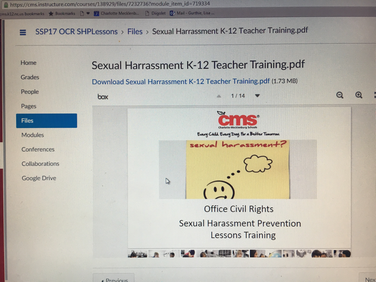
Preparing to Teach the Lesson: Complete the Canvas Course:
​ (Slideshow below shows how it will look)

  1. Be sure which grade level you are going to be teaching the student lessons to
  2. Click this link to go to the Canvas Course: OCR Sexual Harassment Prevention Lessons Training Link to register in Canvas: https://cms.instructure.com/enroll/BFJ93K
  3. Register in Canvas: Click  the enroll in course  button
  4. Click the "Go to course" button
  5. Read the intro message on the home tab that opens immediately
  6. Click the modules tab at left of the inner Canvas screen (see photo below)
  7. Work in order by clicking each module title, starting with the introduction.pdf  (YOU DO NOT HAVE TO DOWNLOAD! Just click the words "Introduction.pdf" and give it time to load and it will show in a box inside your screen.)
  8. Once you are done reading or working inside the screen you will see a box at the bottom right that says “next” if you click that it moves you automatically to the next step and it will load in the box (again, no need to download) (see photo below)
  9. Be careful before you go to “next” that you have done all slides/pages (see photo) of that activity. You can do this by clicking through page by numbered page or by scrolling down on the right hand slider. You can also choose to go fullscreen and press the escape button (ESC)  on your keyboard when done.
  10. When you get to “Grade K” , click back on the word “modules” and skip to the grade you will be teaching to ….
  11. ...view and download the 3 resources for that grade level. These will be what you use to teach ( For example Grade 7 should download the 3 files called: Grade 7 lesson.pdf, Grade7powerpoint.pdf, and Grade7pre-post.pdf )

Teaching the Lesson:
Instructions:
 
  1. Ready the 3 lesson resources you downloaded from your Canvas training (above)
  2. Print or re-read the Facilitator’s guide that was in your Canvas training https://cms.instructure.com/courses/138929/files/7233308/download?download_frd=1
  3. Take attendance. Send list s of all absent students to Ms. Gurthie.
  4. Teach the lesson using those three resources and gude.

See Gurthie for questions you have before the day of the lesson, and she will work with counselors to make sure you have the answers.


0 Comments

    Author

    This blog is a compendium of District and Piedmont -specific PD opportunities, trainings, and notes. 
    Authored by  Lisa Gurthie 
    who specializes in creative lesson ideas especially critical, holistic, and divergent thinking, tech- and arts integration, respect- and curiosity-driven education, and unschooling school to make it more real and relevant. One day she will modernize her "about" page.

    Archives

    November 2019
    July 2019
    March 2019
    December 2018
    November 2018
    October 2018
    September 2018
    February 2018
    October 2017
    May 2017
    April 2017
    March 2017
    February 2017
    January 2017
    December 2016
    November 2016
    October 2016
    September 2016
    August 2016
    May 2016
    April 2016
    February 2016
    December 2015
    November 2015
    October 2015
    September 2015
    June 2015
    May 2015
    April 2015
    March 2015
    February 2015
    January 2015
    December 2014
    October 2014
    September 2014
    August 2014
    July 2014
    May 2014
    April 2014
    March 2014
    January 2014
    November 2013

    RSS Feed

    Categories

    All
    1:1
    2minpd
    Academic Conversation
    Badging
    Blended
    Certifications
    CMS PD
    Common Core
    Community PD
    Critical Thinking
    Culturally Responsive Teaching
    Ed Reform
    Efficiency
    ELL
    Embedding
    Flipped
    GAFE
    Games
    Google Classroom
    HardFun
    Interdisciplinary
    Maker
    Paperless
    PBL
    Personalized
    Personalized PD
    QR Code
    Reading
    Science PD
    Short URL
    SIOP
    Social Media
    Tech

Powered by Create your own unique website with customizable templates.
Photos from docoverachiever, memebinge, Ivy Dawned, www.ilkkajukarainen.fi, Muffet, Diana Boucino, Stephane .Jaspert, sanazmy97, kevin dooley, Mike Licht, NotionsCapital.com, studiohzwei, The Daring Librarian, bobbi vie, madnzany, lisibo, Tjeerd, Nicola since 1972, Brett Jordan, ~Matt LightJam {Mattia Merlo}, denise carbonell, The Lex Talionis, Toolstotal, liverpoolhls, Ninara

  • Celebrating Piedmont
  • StudentSpace
  • Piedmont PD
  • Lesson Ideas
  • News and Thoughts