Piedmont PD
  • Celebrating Piedmont
  • StudentSpace
  • Piedmont PD
  • Lesson Ideas
  • News and Thoughts

How to use "facebook Live" For school

1/25/2017

0 Comments

 
Would you like parents or out of town people to watch special events or student presentations in your classroom? Here are 10 steps to livestream events in your classroom:
​
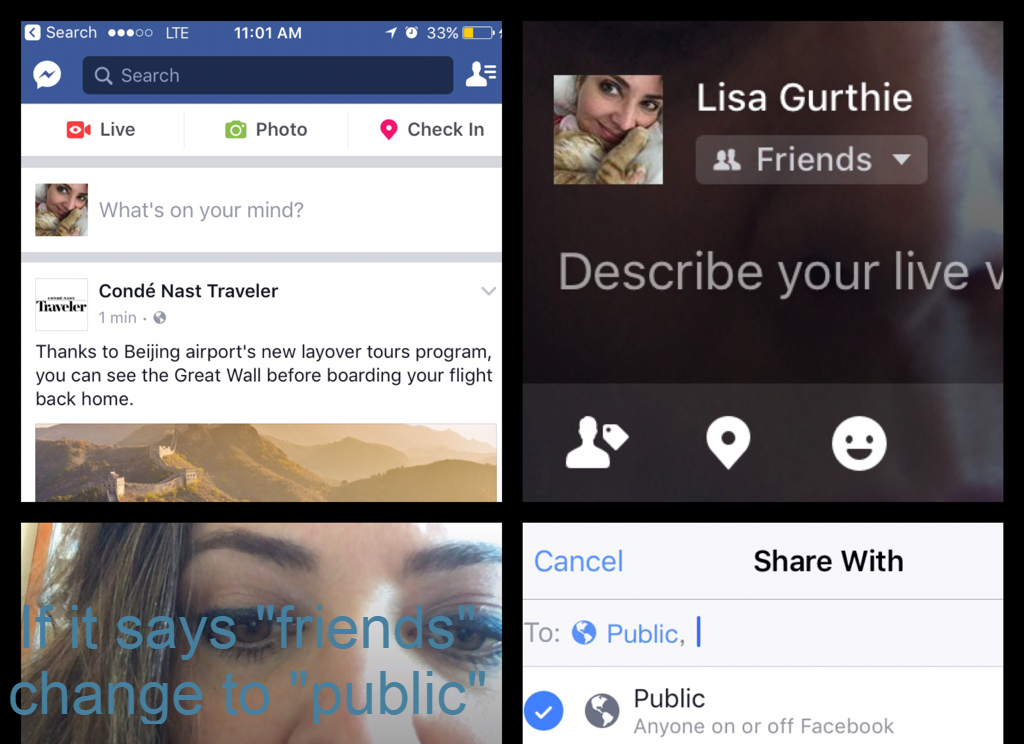
1. Notify viewers of the time to tune in and the URL of the Facebook page you'll be livestreaming from ( for example, your personal page, a school site or other. If you use your personal, you'll be able to set the Live feed to "public" before you begin the stream)
2.Disconnect your phone from school wifi (sorry, you have to use your own data)
3. Open your Facebook app
4 At the top left, press the red movie camera icon that says "live"
5. Make sure to select  your audience as "public" from the dropdown menu next to your profile pic
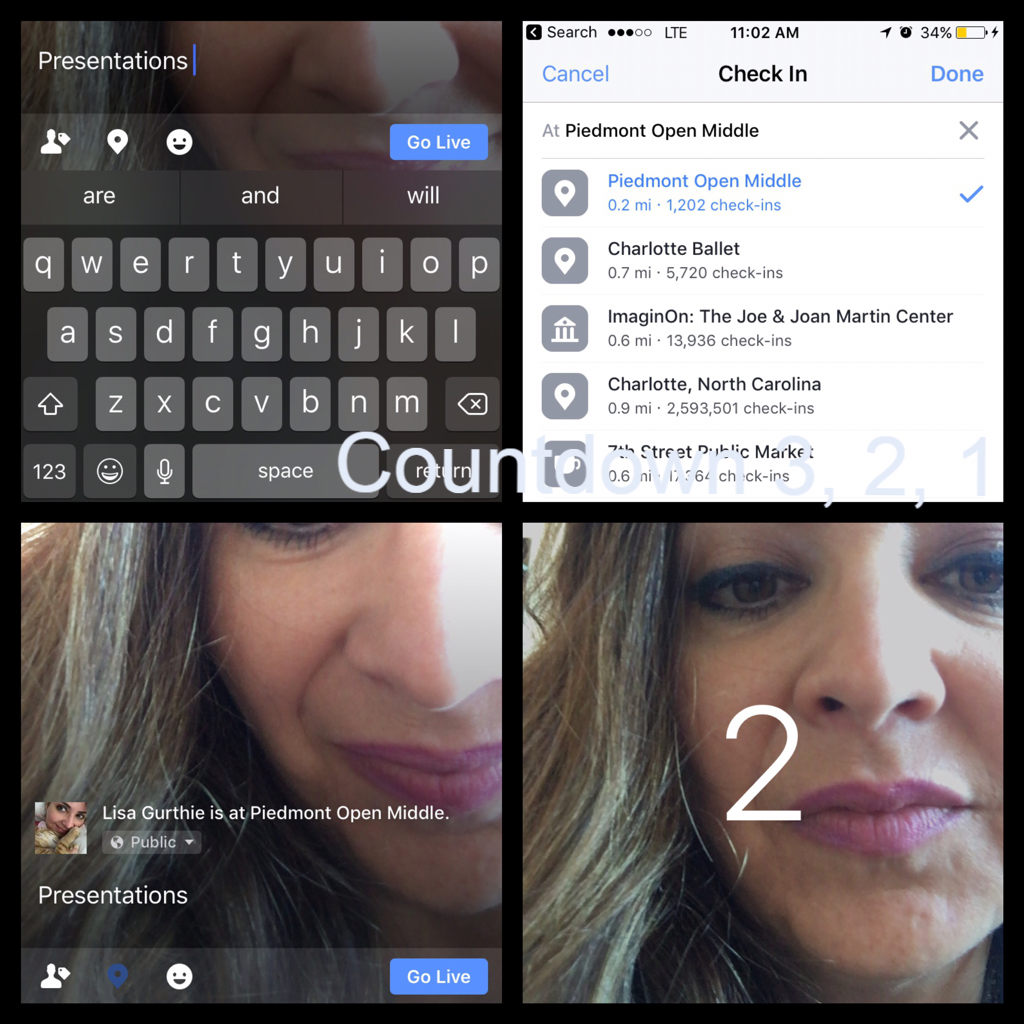
6. Type the title/topic of what you are filming in the text area where it says "describe your live video". Use the map pin icon to add a  location check-in if desired (we're listed on Facebook as Piedmont Open Middle)
7. Press the blue "Go Live" button at the bottom. It will countdown 3,2,1  then begin broadcasting (live streaming)
8. You will see the confirmation "You're live we're building an audience for you." People will be watching
9. Press the speech bubble icon at bottom to view the comments the live audience is leaving, if desired (you'll be able to read them later if you don't watch them during the livestream)
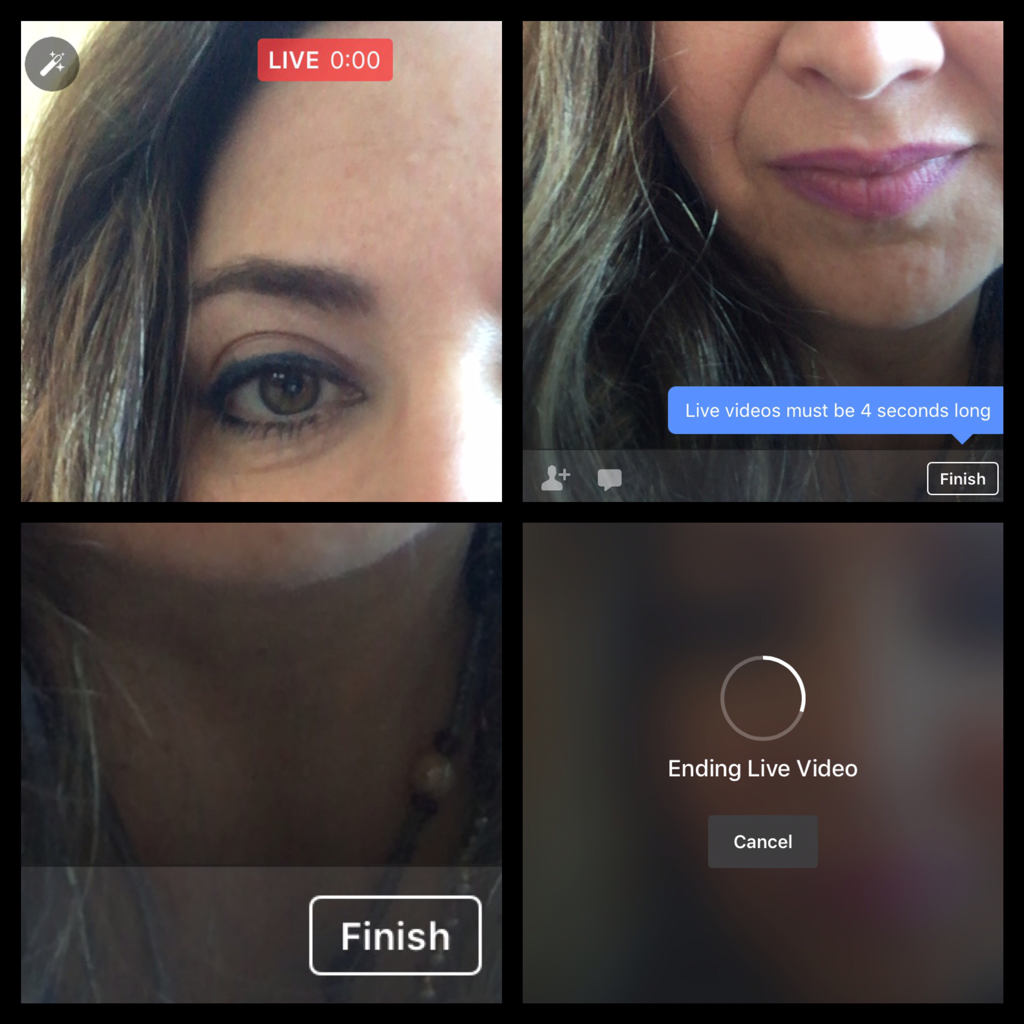
10. Press "finish" when you are done with live streaming the event. From there you can:
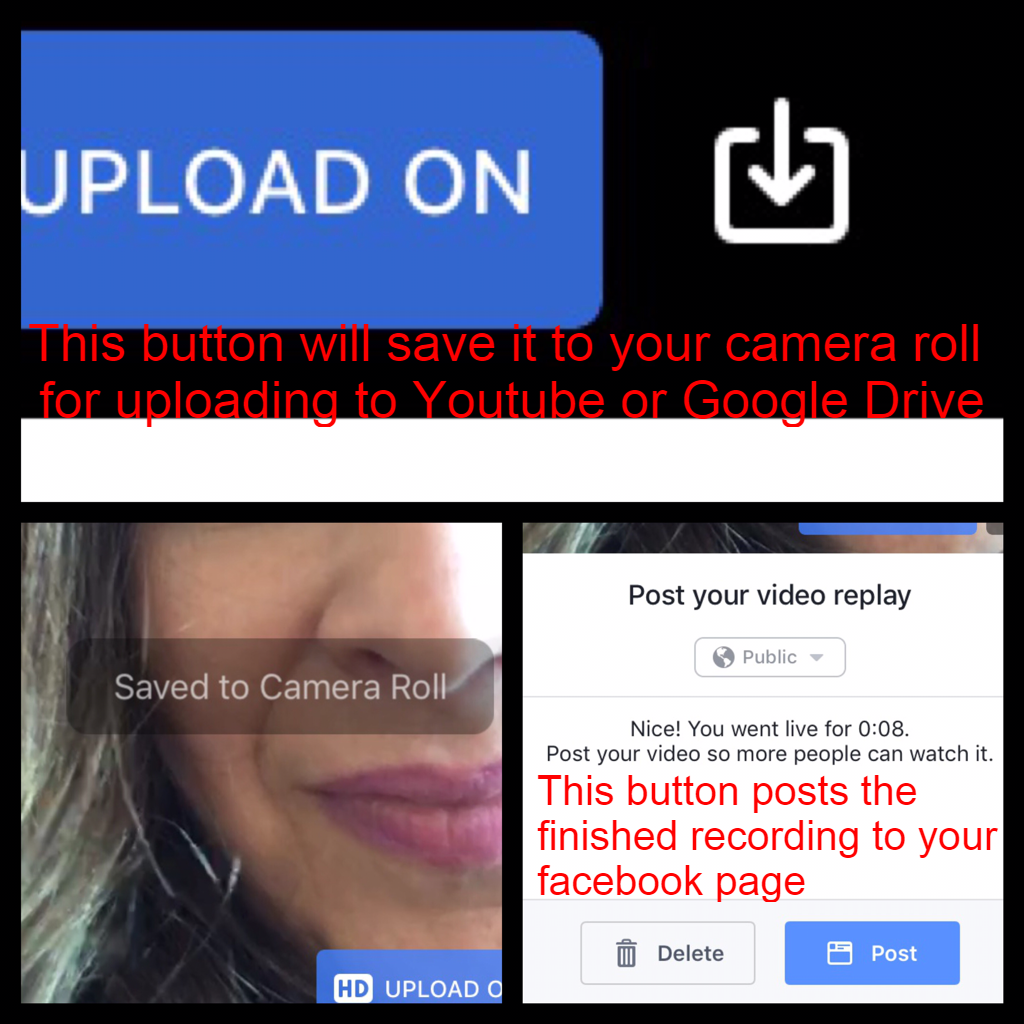
                                     a.   Download  a copy of the video to your camera roll (that will let you then be able to upload it to google Drive or Youtube or edit it via imovie first) 
                                     b.  Post your video to facebook for those who want to watch it later – you can even send the link in your parent newsletter.
                                     c.  If you don't want people to be able to replay the livestream, you have the option at this step  to delete it.

Below are screencaptures of how these steps will look in the app:
Picture
Picture
Picture
Picture
0 Comments

AcaDemiC Conversations Share Out

12/16/2016

0 Comments

 
We want to get our students truly thinking and talking about our content rather than just listening to us, but what's the best way to foster that shift?  

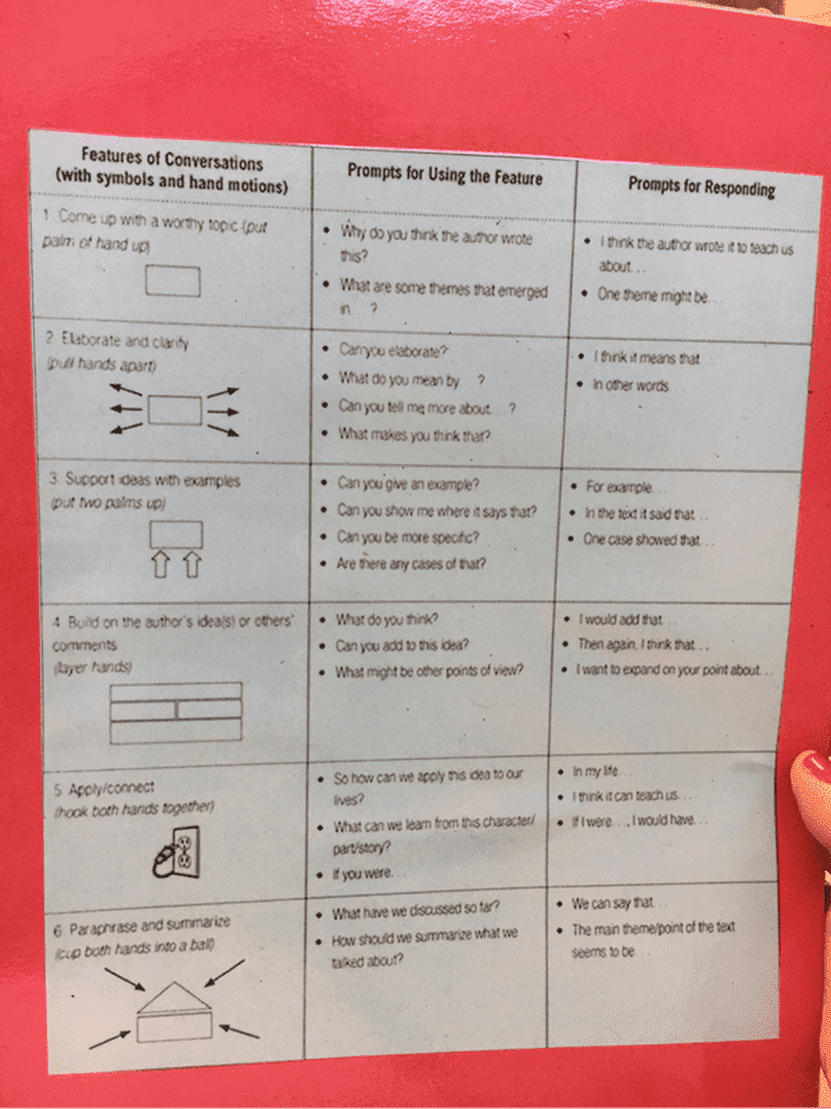
​This Wednesday's faculty meeting at Piedmont featured PLC reps sharing methods to foster academic conversations within their disciplines.

Here are the ideas shared by fellow faculty from the 6th Math, 7th Grade Humanities, 8th Grade Science and Language and Literature Departments:
Picture
Picture
Picture
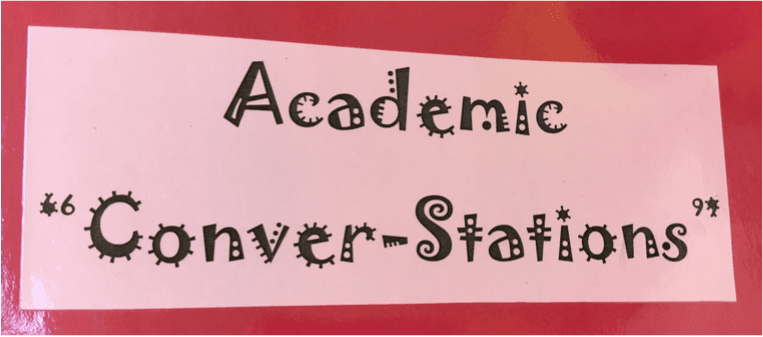
Mr. Chandler shared how to have an Academic ConverStation! He got the ides from the teaching channel website, which he highly recommends. This system allows students to chunk their readings (a close reading strategy) by pausing to discuss and then share out. At the end of each ConverStation question, only ONE person moves to the next station for question 2. Mr. Chandler points out that this is a great system because it allows students to populate the ideas from each group throughout the class, and gives students something to say that no one else in their circle has heard since many issues reappear from question to question.
Picture
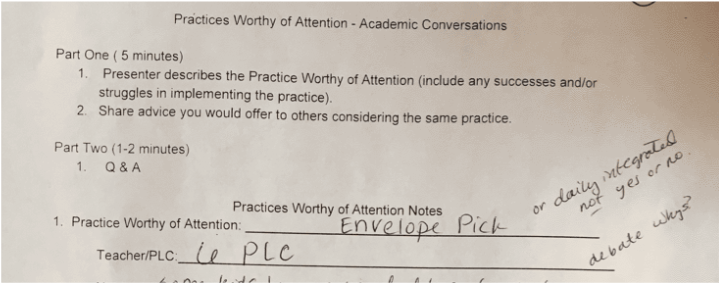
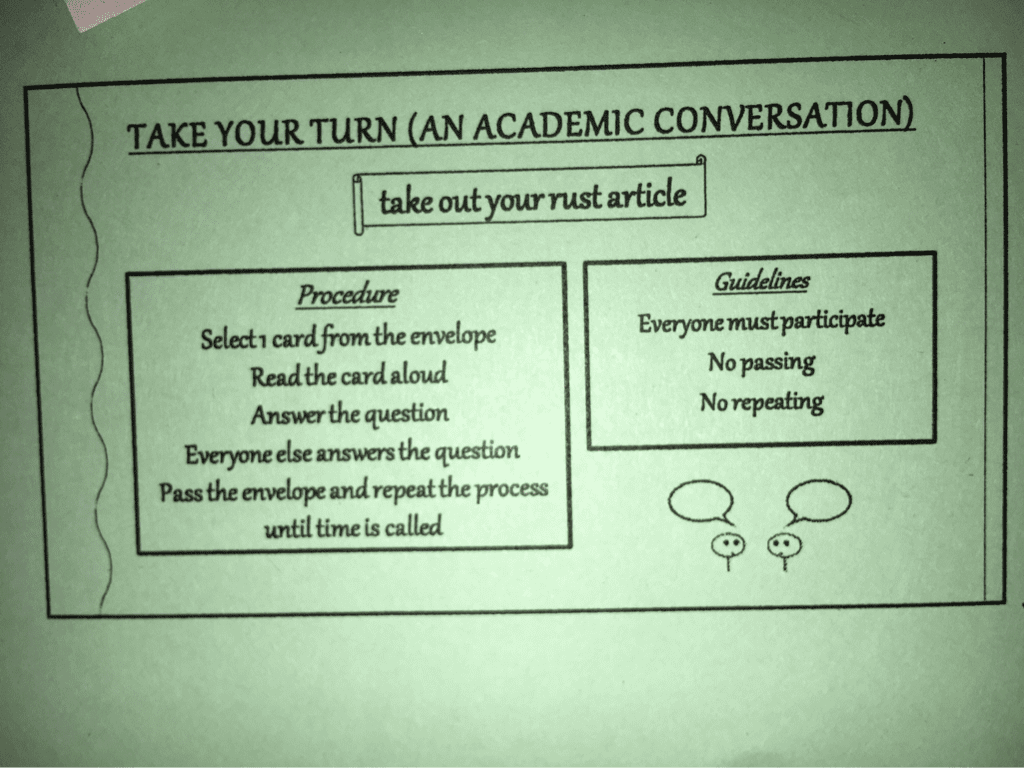
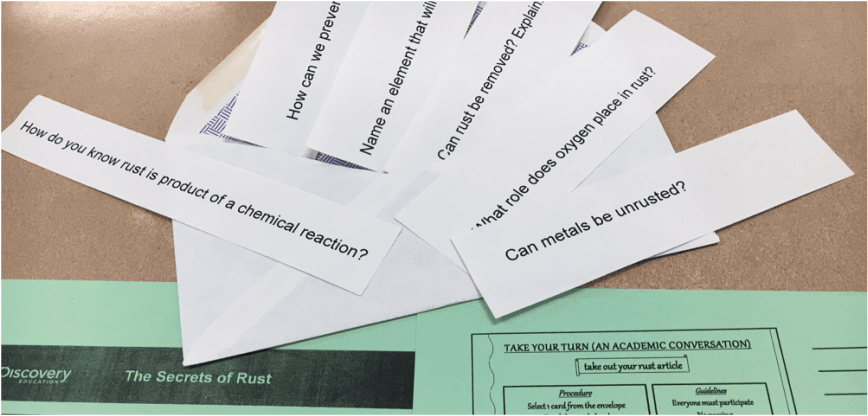
Both the Science and Math departments talked about using Envelope Pull Questions as a conversation starter for their topics. Mr. Kollar pointed out that many students in his class had NEVER had to explain math to another person before that exercise. He recommends the method because students tire of listening to a teacher and enjoy hearing from each other and listen more closely that way. He recommends the structure employed by Ms. Adornato and Beckham for their science lesson you see on the green sheets in these photos) Ms. Beckham and Adornato say that questions that involve some gray area are essential - ones that can be debated. They note that students who thought they could use common sense to "fake" a response without having read were held accountable by classmates who corrected them by referring back to counterintuitive facts listed in the text.
Picture
Picture
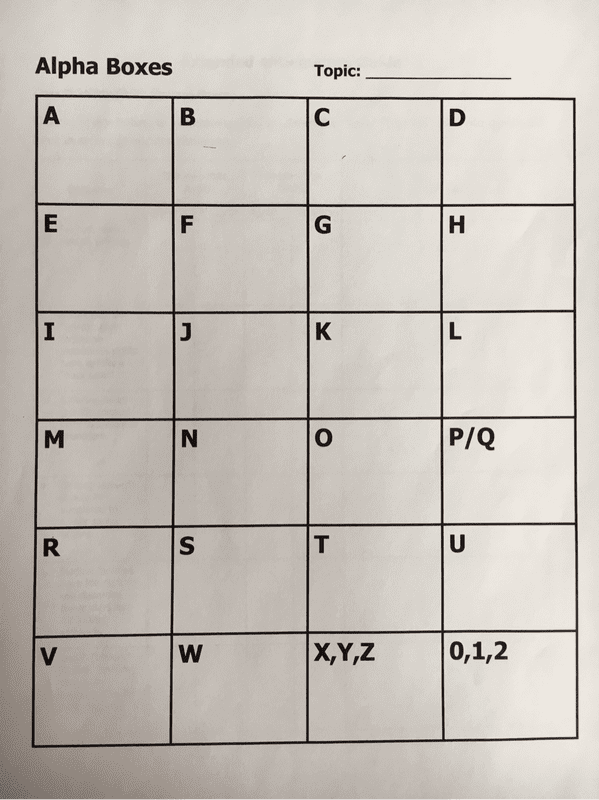
Until I heard Ms. Thornburg, I always thought alpha boxes were very low level and just a step away from busywork. But Ms. Thornburg shared with us how it enhances her lessons in several ways: She begins a unit by having students fill an alphabox. The words they generate function like a pretest, giving her an idea of what they know. Then they watch a video or read a reading from a DBQ set, pausing after each to fill in even more blanks in the alpha box. Through this strategy, students pay closer attention as they listen and look for words they "need." Then they have a class discussion and explain to each other what they chose. As a bonus, the alphabetical constraint forces creative divergent thought (Ms. Thornburg mentioned students comming up with "eXcommunication for the X in the alphabox and with "New Ideas" for the I. Who would have thought that you should give students boxes to get them out of the box?! Great job, Humanities folks (and this works with any content area) After the conversation, students used their alphabox full of vocabulary as notes with ready made ideas for writing.
Related Posts

http://piedmontpd.weebly.com/lesson-ideas/host-an-academic-conversation

Teaching Channel 

https://www.teachingchannel.org/videos/teaching-ells-to-participate-in-discussions-ousd

0 Comments

Using Google Drive for Eportfolios

11/2/2016

0 Comments

 
Years ago, expensive and unweildy 3 ring binders were stored here at school for each student and took up almost a whole room for each grade level.  Now after a bunch of starts we have devised a method to use Google Drive for students'  IB portfolios. Below is all you ever wanted to know about electronic IB Portfolios,   possibly more:

What Is an IB Portfolio?
  • It is a scrapbook of student performance and work samples in the IBMYP. It is meant as evidence of student growth and achievement in IB.
  • Each student's IB portfolio will house 1 samples of student work per IB area per semester (can be electronic copies, photo uploads of 3D or paper-based work, slideshows, etc) In addition to the work samples, each IB area folder also houses the rubric for grading that work and feedback that scores the student on the product can likewise be an uploaded photo of a paper rubric and feedback or a 

How do Students Get an Electronic IB Porfolio?
  • They make one themselves in their Google Drive 
    • 6th grade students who were present at Chromebook orientation have their portfolio already made or started. 7th grade students have been introduced to the portfolio idea but have not created theirs. 8th grade will also need to make theirs.  
    • Student directions and a step-by-step video is at this link:  piedmontpd.weebly.com/studentspace/your-ib-portfolio

How is the IB Portfolio organized?
  • As noted in the  link above, within their CMS GOOGLE DRIVE each student has an IB Portfolio folder (Named "IB Portfolio-your name")  with 8  subfolders labelled according to IB Area :
    • Individuals and Societies - Your Name  (social studies)
    • Language  and Literature- Your Name (English)
    • Language Acquisition - Your Name (Spanish or French)
    • Math -Your Name
    • Science - Your Name
    • Design -Your Name
    • Physical and Health Education - Your Name
    • Arts - Your Name
* "your name" above means student's first and last name.

What goes in to the IB Portfolios:
  • Each IB Area subfolder will house 4 -8  IB works samples with completed self-and teacher- assessment rubrics per year each of the three years they are at Piedmont in the MYP.
    • In the 2017 school year, students will add 4 samples of work to each folder per Ms. Barone . instruct your students over the next semester to add  4 assignments plus the completed rubric assessment for each into the folder for the subject ara you teach.
​
When do students add work to their portfolio folders?
  • Students can add work to their folders at any class or team time you designate. You should designate some upload and organization time each semester.

How do students add work samples to the appropriate  IB Portfolio subfolder for the class?
  • 2 ways:
    • if the work is done on paper or is a physical creation, the student will:
      1. take a photo using Chromebook, iPad, or BYOT device
      2. upload it to Google Drive
      3. move it into the designated IB Portfolio Subfolder.
    • If the work is electronic* ,student will :
      1. upload it to Google drive (from a flash drive, Documents file, or other)
      2. add it to the desinated IB Portfolio subfolder 
* if the work is already in Google Drive (from Google Classroom or other) , students need only "make a copy" and place that copy in the appropriate IB Portfolio Folder.

How are competed rubrics added to the  IB Portfolio Subfolders ?

To add a paper copy :
  1. Student takes a photo using Chromebook, iPad, or BYOT device 
  2. Student Uplaod it to Google Drive
  3. move it into the designated IB Portfolio Subfolder.

​To add an Electronic Copy:  
  1. Teacher downloads rubric  from Ms Gorman's IB Resources Folder  
  2. Teacher personalizes rubric as needed
  3. Teacher  uploads that personalized copy to their Google drive
  4. Teacher distribute and marks up in Google Drive . (see video below for one way to do this:
    1. assign the rubric as a Google classroom assignment,
    2. share it with the students - selecteach get a copy
    3. students use a "chrome extension" ( such as Goobric or the one in the video) to open the copy,  self assess then "turn it in"
    4. Teacher then marks their assessment comments and returns the rubric to student via google classroom (or drive).  
    5. Students then make a copy and move the returned assignment copy into the proper folder of their portfolio. 
0 Comments

PD Opportunities

10/27/2016

0 Comments


Earn Renewal Credits for  Planning


November 8th, 2016 (11:00-1:00pm)

Register for Think Tank
MY TALENT CODE: 416080 
Need some additional collaborative work time? This is not a traditional PD, but instead a open work session time! This is a chance to collaborate with other grade level teachers and PL Specialists and front load your planning by creating playlists, pathways, choice boards, PBL's, etc. During this work time, you can walk away with a product to use during this school year! Be sure to bring any standard resources, tasks, or a device that you would want to utilize!

Read Write for Google 

Picture
This is a tool that all students have on their chromebooks so come learn how you can have them use it to do better in your class.
readwrite_for_google_-_flyer_10-21-16.pdf
File Size: 197 kb
File Type: pdf
Download File

DYKNow

Picture
 link to a Canvas course  Ms. Newburger shared. (Reminder You will have to log-in to NCedcloud)

Twitter for Educators

Picture
http://www.edutech.nodak.edu/westcentral/files/2013/01/Twitter-for-Educators.pdf
0 Comments

Close Reading at Piedmont

9/13/2016

0 Comments

 
Picture
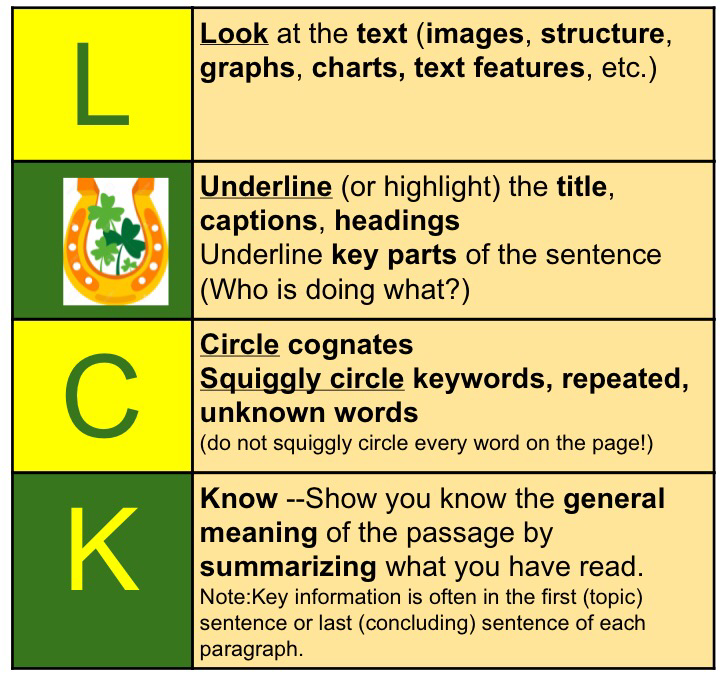
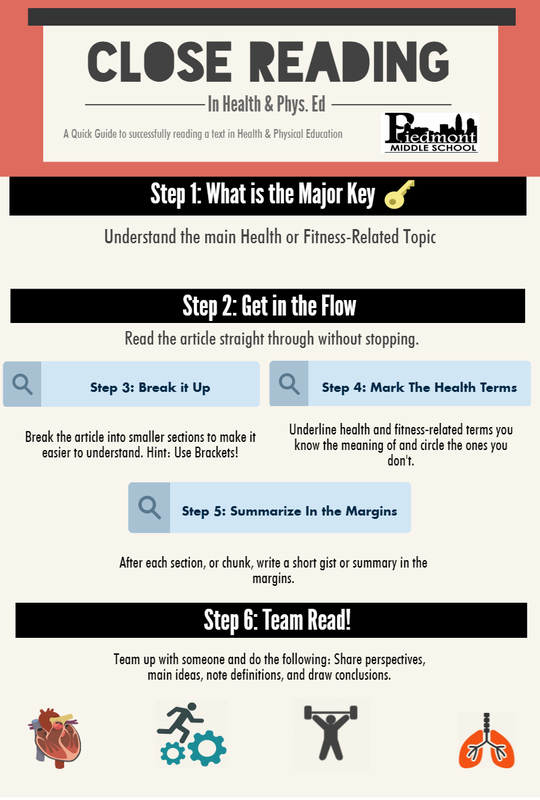
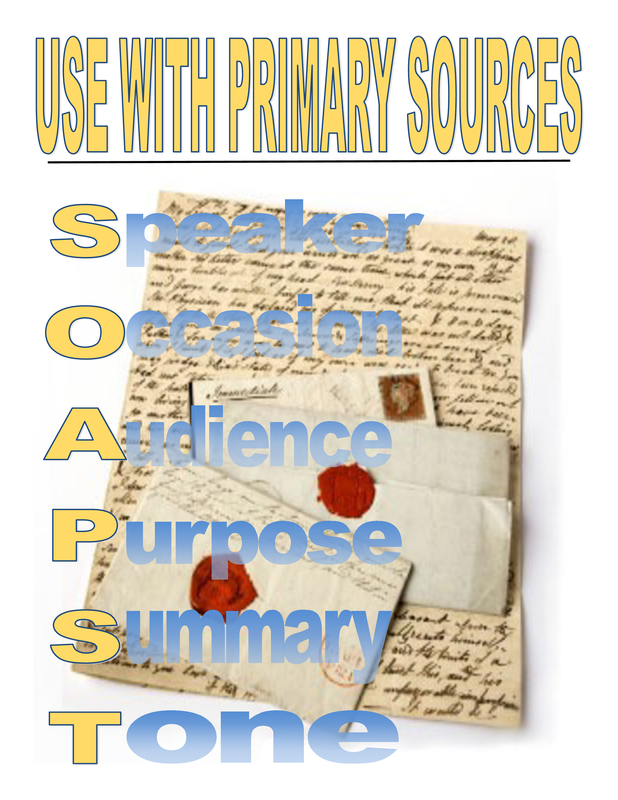
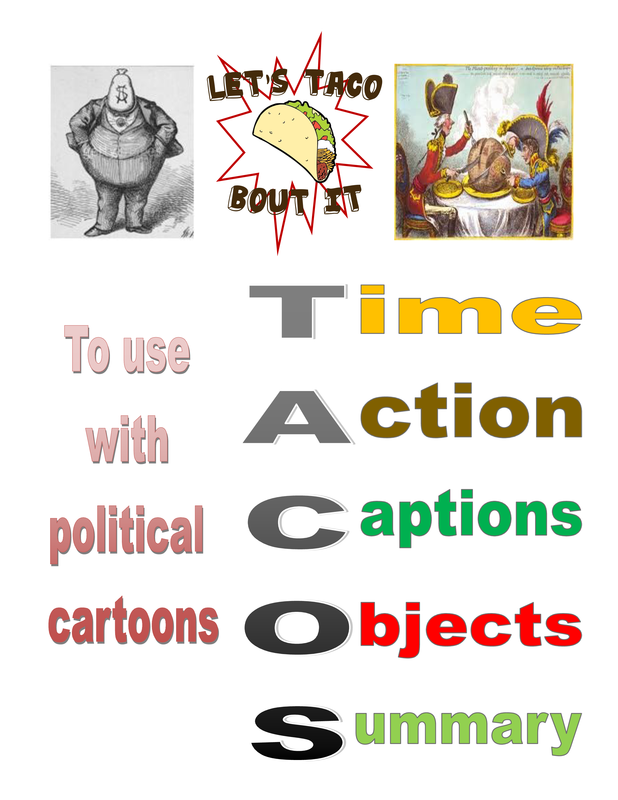
Here are some of the Close Reading strategies in use in each content area here at Piedmont, depending on the assignment. Can you apply any of these to your content? It is good for students to experience multiple strategies for attacking different types of text.

World Language Close Reading "Luck" 

Picture
Picture
Picture
Picture
Related Posts:
  • Teach Close Reading with Diigo piedmontpd.weebly.com/lesson-ideas/teach-close-reading-with-diigo
  • Metacognitive Partner Talk: A close Reading strategy piedmontpd.weebly.com/lesson-ideas/metacognitive-partner-talk-a-reading-and-thinking-strategy
  • The Whys and Hows , Do's and Dont's of Close Reading http://piedmontpd.weebly.com/piedmont-pd/april-13th-2016
0 Comments

IB PD Presentations

8/29/2016

0 Comments


Access the orignal IB Webinars here 

Unit Planning Videos
 from Ms. Gorman
​
https://www.youtube.com/watch?v=-KdEkT21DG4

https://www.youtube.com/watch?v=XbxDHqf883g

Picture

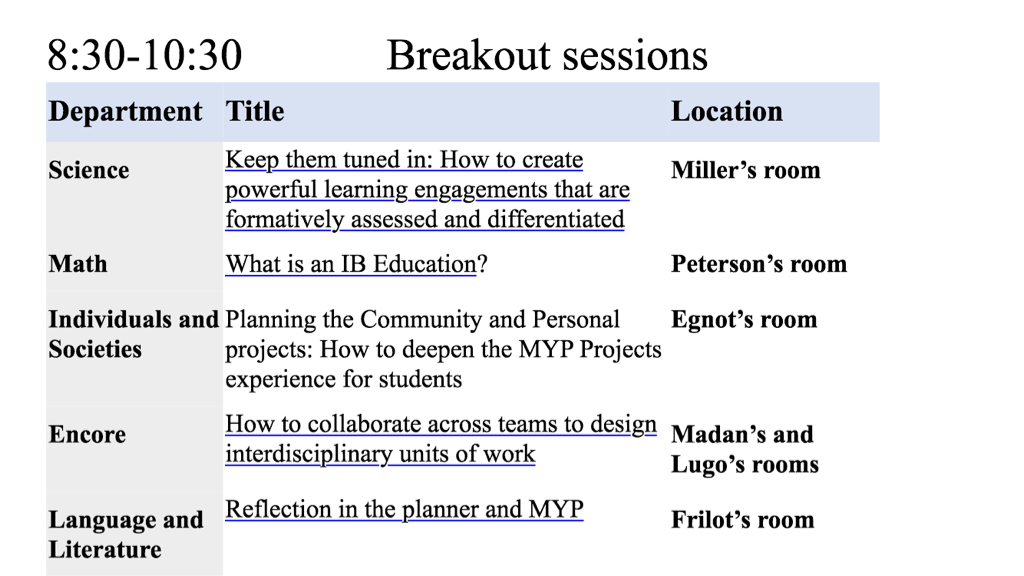
What is an IB Education?  
​- math PLC

Keep them tuned in: How to create powerful learning engagements that are formatively assessed and differentiated​​
Planning the Community and Personal projects: How to deepen the MYP Projects experience for students
-​Humanities PLC

refer to the Piedmont IB community project website
How to collaborate across teams to design interdisciplinary units of work
Picture
Get big on the PIG at bit.ly/BIGonthePIG

P
urposeful

Intergrative
Grounded in Disciplines   

Reflection in the planner and MYP
0 Comments

IB Webinars PD 2016

8/21/2016

0 Comments

 
Picture
Picture
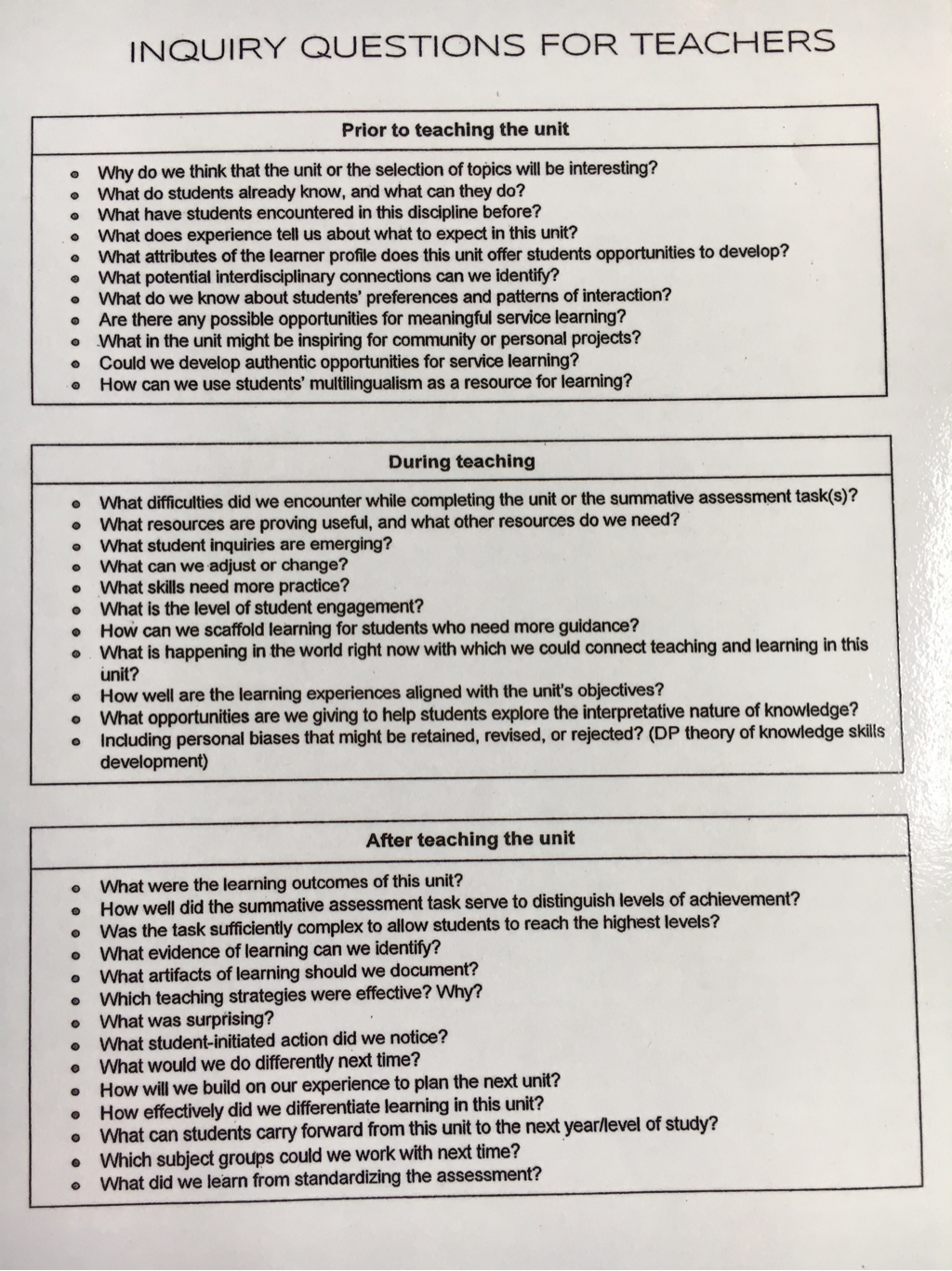
Click on the title of the IB Webinar Ms. Gorman assigned your Team and viiew it to create a 10-12 minute presentation to the staff with a product. Use graphic organizers, mnemonic devices whenever possible and try to incorporate a new tool in your product or presentation Recommended: have From Principles into Practice and your IB subject guide available for reference as you watch

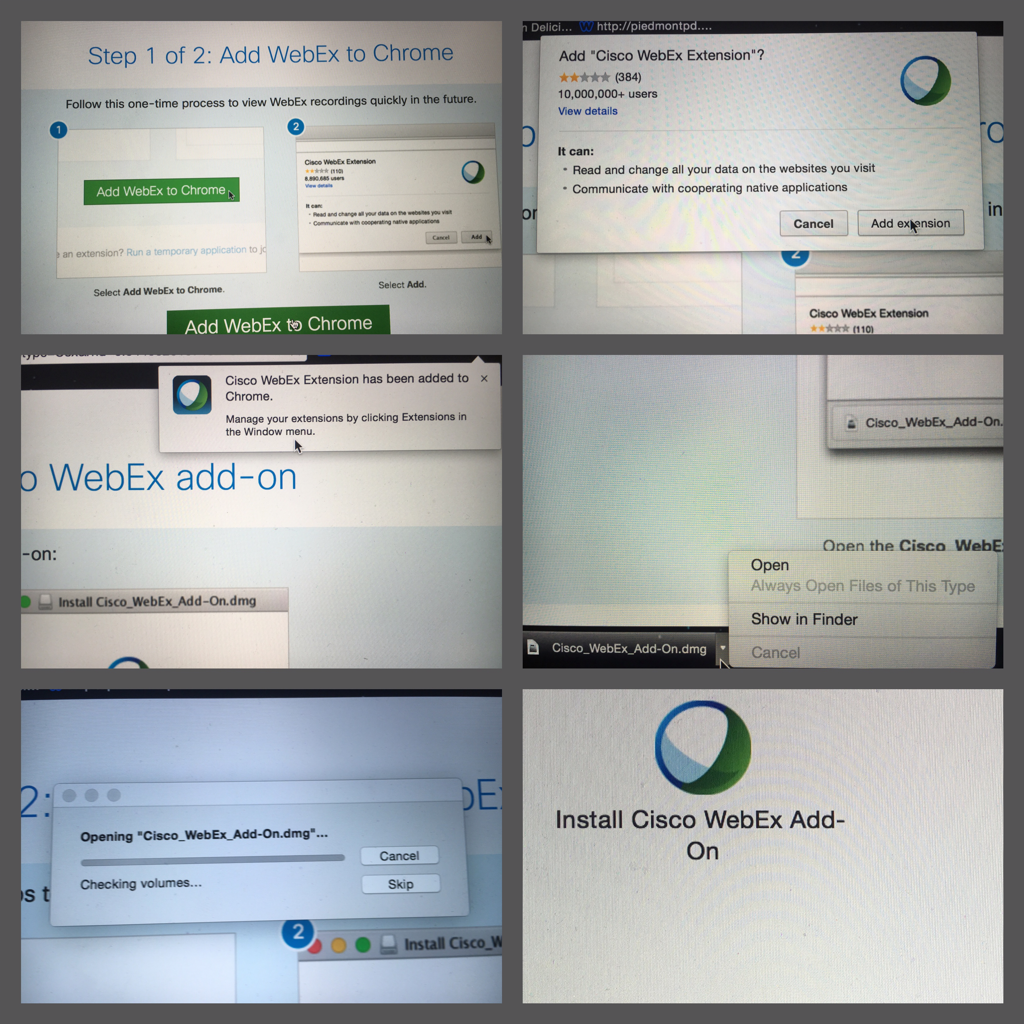
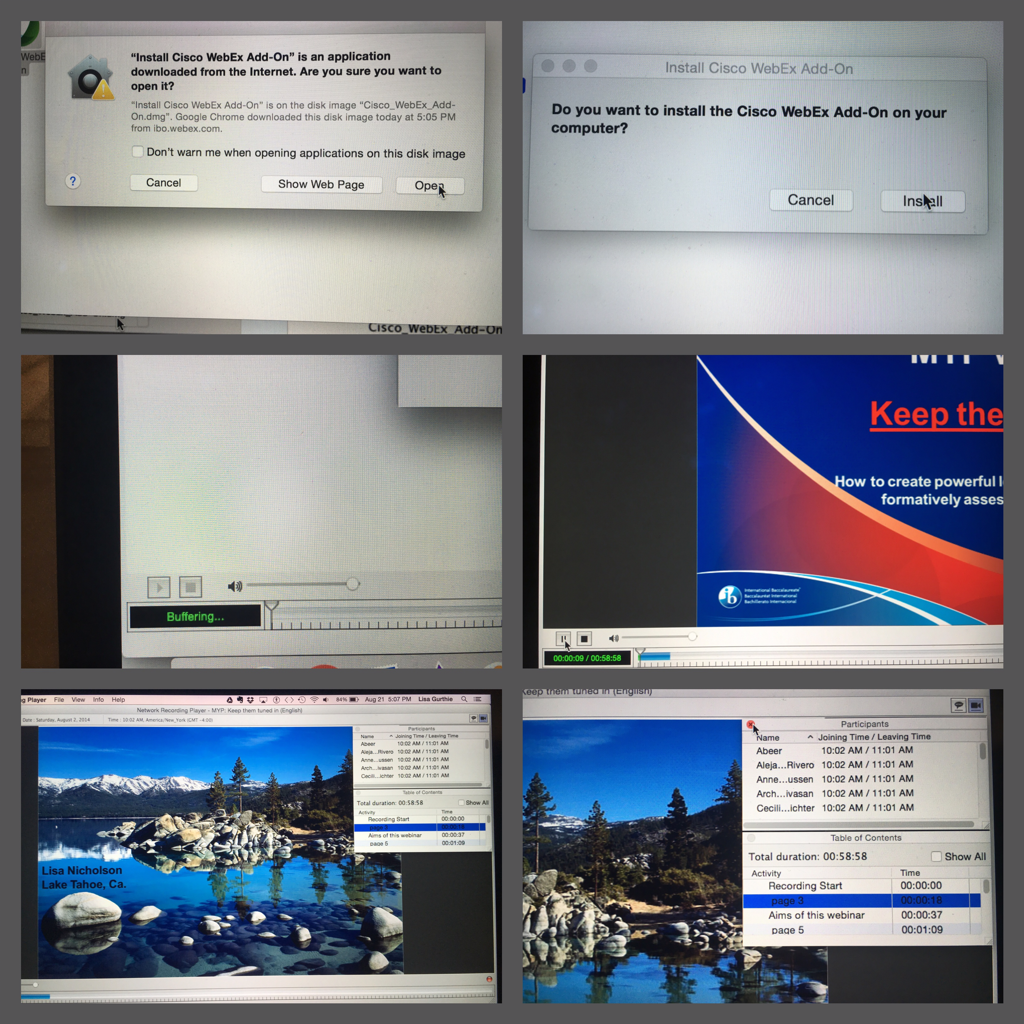
Each webinar is password protected.  Piedmont staff can access the password and technical instructions by signing into their Piedmont Google Drive account and clicking here.

IB MYP Professional Development Webinars:
  • Keep them tuned in: How to create powerful learning engagements that are formatively assessed and differentiated
  • What is an IB Education? (continuum)
  • Planning the Community and Personal projects: How to deepen the MYP Projects experience for students
  • How to collaborate across teams to design interdisciplinary units of work
  • Reflection in the planner and MYP (continuum)

Anyone wishing to review last year’s webinars, those topics were::


  • What’s the concept? How to establish conceptual understandings
  • Going global: How to integrate global contexts with the conceptual understanding to create a statement
  • Inquiring minds want to know: How to write compelling inquiry questions
  • Creating summative assessments: How to design authentic assessments that are grounded by the subject group objectives and their strands
  • Making sense of categories and clusters: How to plan for approaches to learning

Picture
Picture
Picture
0 Comments

PErsonalized Learning ReSources for 2016

8/19/2016

0 Comments

 
We successfully completed a pilot of the CMS PL program last year. We will continue to have the support of Lisa Allred and the CMS PL team as we continue to learn how to personalize education.


If PL is something you've not really dealt with yet, you can begin by perusing resources at this link:

http://pl.cmslearns.org/playbook/

For  ready-made resources geared toward CMS middle school, check outthis Google Drive Folder  of content specific ideas.

I was checking out the high school section and found this structural template that gives you an idea of one way to personalize that can be adjusted to any learning goal.

Cutting Edge eduBonus, consider starting at "create!" 

If you would like 1 on 1 brainstorming, lesson demo, help team or unit planning, email me anytime. 
-Lisa Gurthie
Finally, we will be taking advantage of district led PL trainings this year. Please choose the training you are most interested in from these choices 

 http://goo.gl/vlFrLJ


Cast Your Vote HERE

0 Comments

Summer Training Choices

5/6/2016

0 Comments


Earn PD credits plus have a head start on next year's planning!

Picture
This could be you frolicking in fields of flowers after your year is all planned!
Summer PD offerings links:
  • CMS General Summer PD
  • CMS Personalized Learning PD
 ​You may need to be signed in to your cms google drive account to view the catalog.These PDs are only available to CMS schools that took part in the Personalized Learning pilot like we did (we are cohort 2) but the topics are helpful for anyone who would like to get better use of their teachnology, better student buy-in on assigments, and who would like to front load their planning so that classes run more smoothly day-to-to day.

Note these two courses: 
1-ONLINE PD
 INS Time to Own It Virtual Course Summer 2016  MyTalent code 429875
Would you like your students to own their own learning? Would you like them to be able to tell you at any time which of your course standards they have already mastered and which they need to work on? If so, sign up for this course:

  • totally online-​Take the course anytime between June and August 19th at your own pace via Canvas. 

2-IN PERSON PD  
THINK TANK  MyTalent  Code: 416080 
 Open work session time! This is a chance to collaborate with other grade level teachers and PL Specialists and front load your planning by creating playlists, pathways, choice boards, PBL's, etc. During this work time, you can walk away with a product to use during this school year!  Be sure to bring any standard resources, tasks, or a device that you would want to utilize
  • Monday June 13th, 2016 9:00-11:00 OR 1:00-3:00 - Atrium (4121 Stuart Andrew Blvd.) Room 101


Related Posts:
http://piedmontpd.weebly.com/piedmont-pd/how-to-use-mytalent-to-register-for-pd-the-new-mypd 
0 Comments

Close Reading- The Whys. The dos. The Donts.

4/13/2016

0 Comments

 
"A close reading, though, reveals mostly empty language..."

​- Charlotte Observer 4/12/2016
Picture
Close reading should pull back the curtain veiling full comprehension.
 HB2 Brings home the real-life importance of teaching close reading.  No matter how you interpret the bill, as the Charlotte Observer points out, it requires a close read. 

Close reading isn't a time waster where you give students the same old worksheet except  this time make students annotate and re read until they are sick of it. Close reading has become almost meaningless edujargon but is actually an essential life skill.

Close reading is really just a venue for teaching critical thinking and careful evidence gathering. Without close reading,  students are at the mercy of those on both sides of the aisle who twist interpretations for a living. This doesn't just happen in politics. It happens in marketing, advertising, retail, social and commercial situations of all kids.
Picture
Picture
Picture
Picture
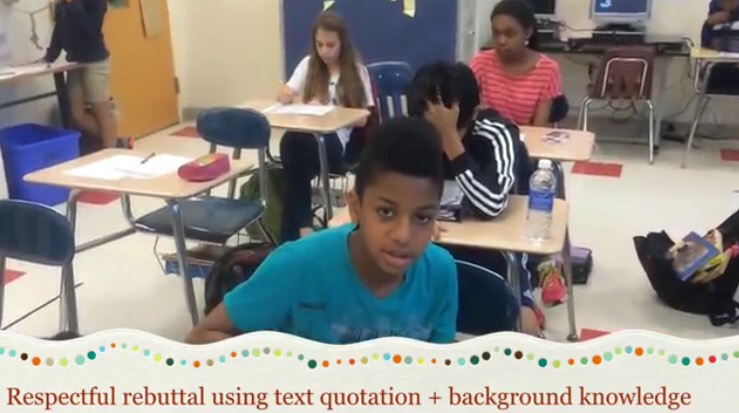
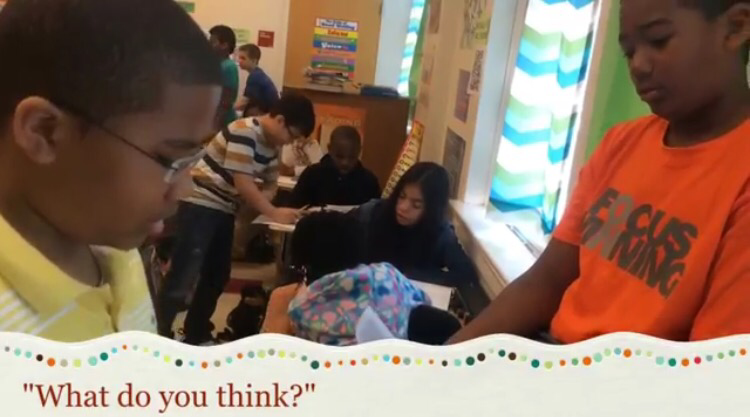
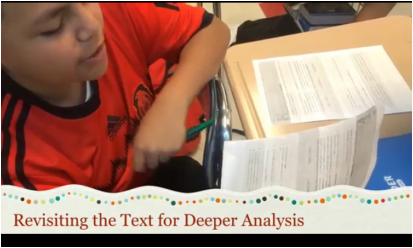
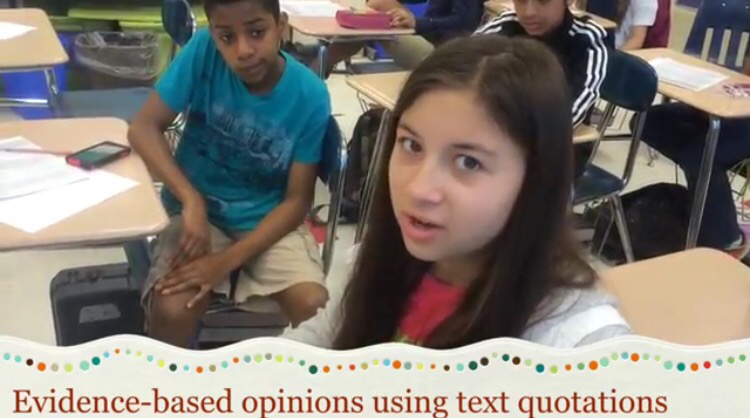
To view students above practicing close reading go to http://piedmontpd.weebly.com/lesson-ideas/metacognitive-partner-talk-a-reading-and-thinking-strategy
text = any work you are examining closely, written or other. read= the process of closely examining it.

Teacher Close Reading Do's and Dont's:
  • Do Choose a worthy text (see below)
  • Do "chunk" it if if is larger.
  • Do model metacognition and close reading for students.
  • Do Re-read and annotate.  
​BUT...
  • Don't have students annotate and discuss something that is already straightforward-- If  it can be fully understood  in one read, it is not challenging enough. Find something else.  (However, I have done 3o minute socratic seminars just on Jack and the Beanstalk, so don't confuse big words with depth)
  • Don't stop with comprehension questions- they are step one. Close reading requires two more steps. 

 A good "Close Reading" text should :
  • be motivating (example math problems featuring Mr. Davis)
  • have multiple or hidden meanings (should NOT be fully understandable in just one reading)
  • During the The Close Reading Process students Students should
  • "talk to the text" when close reading--using annotation strategies appropriate to the discipline (examples: the "CUBES"strategy for math problems and the "Notice and Note" annotations for ELA)
  • discuss with each other and explain why they think what they do.

This article summarizes some good points if you are still not sure.
http://www.shanahanonliteracy.com/2012/06/what-is-close-reading.html
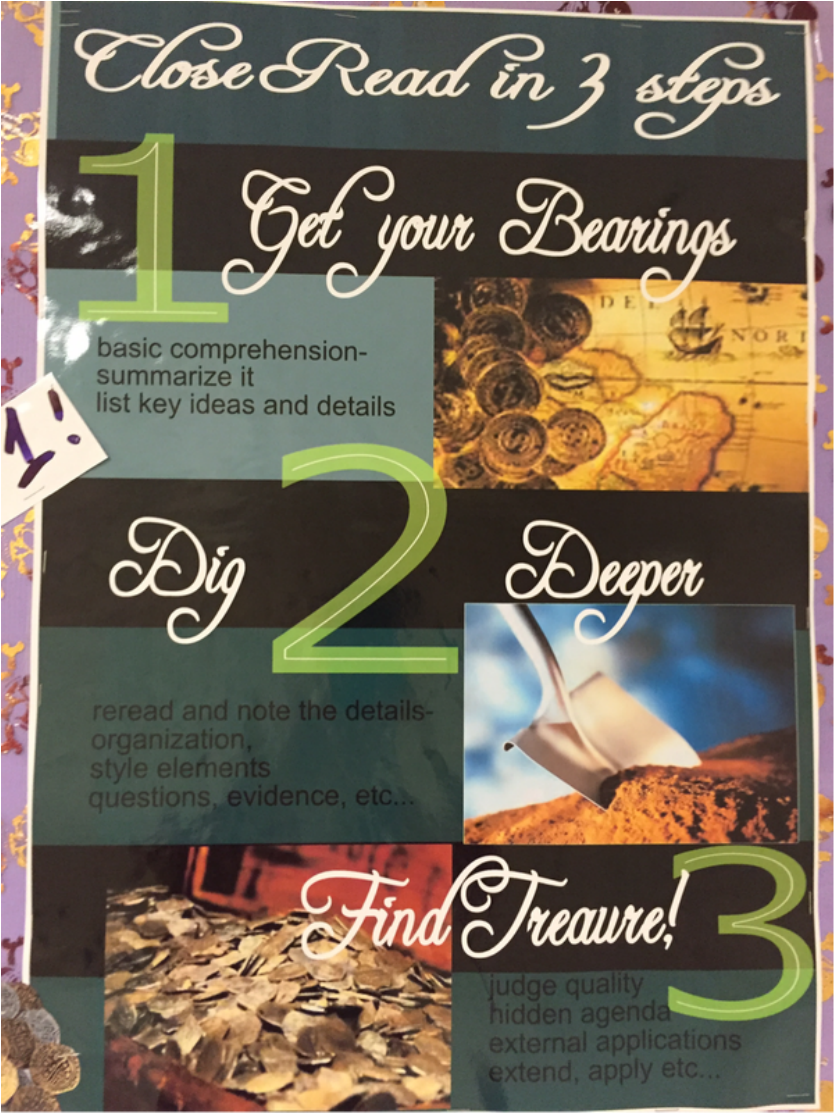

Picture
As part of your PLC walk-through please, stop by the Close Reading bulletin board to discuss. Note ways that close reading is being used at Piedmont and what makes the example close reading. ​ Do the samples give you any ideas for your own classroom? Which one(s) are your favorite? What would you change?
Don't forget to leave positive notes about what you observe as you watch your coworkers tomorrow in the walk through.

Resources:
Close Reading Visual Media -short documentaries to use in class
Close Reading  Annotation Tool - Diigo - to use with Chromebooks
Close Reading Graphs and Charts - Turner's Graph of the Week

Related Posts:
http://piedmontpd.weebly.com/piedmont-pd/text-dependent-questions
http://piedmontpd.weebly.com/lesson-ideas/metacognitive-partner-talk-a-reading-and-thinking-strategy
0 Comments
<<Previous
Forward>>

    Author

    This blog is a compendium of District and Piedmont -specific PD opportunities, trainings, and notes. 
    Authored by  Lisa Gurthie 
    who specializes in creative lesson ideas especially critical, holistic, and divergent thinking, tech- and arts integration, respect- and curiosity-driven education, and unschooling school to make it more real and relevant. One day she will modernize her "about" page.

    Archives

    November 2019
    July 2019
    March 2019
    December 2018
    November 2018
    October 2018
    September 2018
    February 2018
    October 2017
    May 2017
    April 2017
    March 2017
    February 2017
    January 2017
    December 2016
    November 2016
    October 2016
    September 2016
    August 2016
    May 2016
    April 2016
    February 2016
    December 2015
    November 2015
    October 2015
    September 2015
    June 2015
    May 2015
    April 2015
    March 2015
    February 2015
    January 2015
    December 2014
    October 2014
    September 2014
    August 2014
    July 2014
    May 2014
    April 2014
    March 2014
    January 2014
    November 2013

    RSS Feed

    Categories

    All
    1:1
    2minpd
    Academic Conversation
    Badging
    Blended
    Certifications
    CMS PD
    Common Core
    Community PD
    Critical Thinking
    Culturally Responsive Teaching
    Ed Reform
    Efficiency
    ELL
    Embedding
    Flipped
    GAFE
    Games
    Google Classroom
    HardFun
    Interdisciplinary
    Maker
    Paperless
    PBL
    Personalized
    Personalized PD
    QR Code
    Reading
    Science PD
    Short URL
    SIOP
    Social Media
    Tech

Powered by Create your own unique website with customizable templates.
Photos from docoverachiever, memebinge, Ivy Dawned, www.ilkkajukarainen.fi, Muffet, Diana Boucino, Stephane .Jaspert, sanazmy97, kevin dooley, Mike Licht, NotionsCapital.com, studiohzwei, The Daring Librarian, bobbi vie, madnzany, lisibo, Tjeerd, Nicola since 1972, Brett Jordan, ~Matt LightJam {Mattia Merlo}, denise carbonell, The Lex Talionis, Toolstotal, liverpoolhls, Ninara
  • Celebrating Piedmont
  • StudentSpace
  • Piedmont PD
  • Lesson Ideas
  • News and Thoughts